Camera Shutter Count: How Many "Clicks" Are Too Many?
How to Check Your Camera Shutter Count — Free Tool + Full Guide (2026)
Every camera has a hidden number that tells you exactly how much life it has left. It's called the shutter count — and whether you're buying a used camera or checking your own, knowing this number can save you hundreds of dollars.
This guide covers everything: what a shutter count is, how to check it for free on any device, what the number means for every major brand, and when to worry.
What is a camera shutter count?
Every time you press the shutter button, the internal mechanism opens and closes to capture your photo. That single movement is one shutter actuation — or in plain terms, one "click."
The shutter count is the total number of times your camera has done this since it left the factory. Think of it as the odometer of your camera. Just like you'd check the mileage on a used car before buying, the shutter count tells you exactly how much wear the camera has accumulated.
Is the shutter count the same as the file number?
No — and this is one of the most common mistakes people make.
If your last photo is named `IMG_4823.JPG`, that does not mean your camera has taken 4,823 photos. Most cameras use a four-digit numbering system that resets automatically after 9,999 shots. It also resets when you insert a new memory card or manually change it in the settings.
File numbers are for organising your photos. Shutter count is for measuring actual wear. They are completely different.
How to check your shutter count — every method
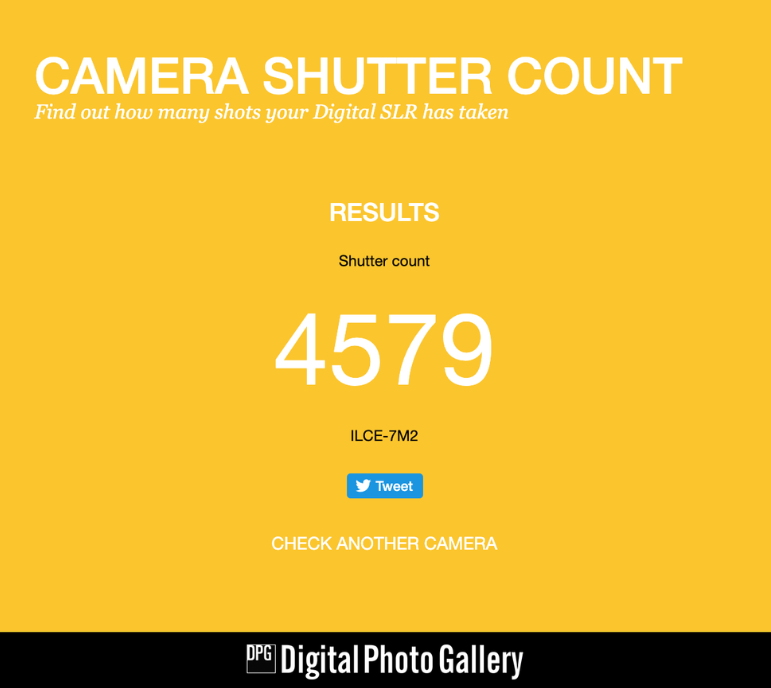
The fastest way:camerashuttercount.com
1. Take a photo with your camera (RAW format works best, but JPEG also works for most brands)
2. Go to camerashuttercount.com
3. Upload the photo
4. Your shutter count appears instantly
This works for Canon, Nikon, Sony, Fujifilm, Pentax and most other brands. It reads the hidden EXIF metadata embedded in every photo file — data that records the shutter count at the moment the photo was taken.
How to check shutter count on a Mac
1. Open a RAW file in Preview
2. Go to Tools → Show Inspector
3. Click the "i" icon, then the EXIF tab
4. Scroll down to "Image Number" — that is your shutter count
This works without any additional software and is completely free.
How to check shutter count on Windows
The easiest free option is ExifTool:
1. Download ExifTool from exiftool.org (free)
2. Drag your RAW file onto the ExifTool executable
3. Look for "Shutter Count" or "Image Number" in the output
Alternatively, PhotoMe is a free Windows app with a visual interface that shows the same information without the command line.
How to check shutter count on iPhone or Android
Upload a recent RAW photo to camerashuttercount.com directly from your phone browser. It works on mobile without needing to install anything.
Camera-specific methods
Canon: Most Canon cameras do not show the shutter count in the menu. Use camerashuttercount.comor ExifTool with a RAW file. Some Canon bodies also work with the free tool EOS Info (Windows only).
Nikon: Nikon embeds the shutter count in NEF (RAW) files. Upload to camerashuttercount.com or use ExifTool. Note: Nikon does not include shutter count in JPEG metadata on most models, so always use a RAW file.
Sony: Sony Alpha cameras (A7, A6000 series etc.) store the shutter count in JPEG metadata as well as RAW, so any recent photo works on camerashuttercount.com.
Fujifilm: Fujifilm cameras store shutter count in RAF (RAW) files. Usecamerashuttercount.comor ExifTool. Note that Fujifilm also counts electronic shutter actuations separately from mechanical — the number you see is usually the mechanical count.
Olympus / OM System: Use ExifTool and look for the "ShotNumberSincePowerOn" field, or upload to camerashuttercount.com.
What is a good shutter count?
There is no universal answer — it depends entirely on the camera model and how it was used. A camera used in a professional studio sees very different conditions than one used for casual family photography.
That said, here are the general benchmarks:
| Camera type | Typical rated lifespan |
|---|---|
| Entry-level DSLR / mirrorless | 100,000 – 150,000 clicks |
| Mid-range DSLR / mirrorless | 150,000 – 200,000 clicks |
| Pro-sumer body | 200,000 – 300,000 clicks |
| Professional body | 400,000 – 500,000+ clicks |
Shutter count by brand — full breakdown
Canon shutter life expectations
| Model | Type | Rated shutter life |
|---|---|---|
| EOS R50 / R100 | Mirrorless (current) | ~100,000 |
| EOS R10 | Mirrorless (current) | ~150,000 |
| EOS R8 | Mirrorless (current) | ~150,000 |
| EOS R7 | Mirrorless (current) | ~200,000 |
| EOS R6 Mark II | Mirrorless (current) | ~300,000 |
| EOS R6 Mark III | Mirrorless (current) | ~300,000 |
| EOS R5 Mark II | Mirrorless (current) | ~500,000 |
| EOS R3 | Mirrorless (current) | ~500,000 |
| EOS 1300D / 2000D / 4000D | DSLR (older) | ~100,000 |
| EOS 800D / 850D (Rebel T7i / T8i) | DSLR (older) | ~100,000 |
| EOS 200D / 250D (Rebel SL2 / SL3) | DSLR (older) | ~100,000 |
| EOS 90D | DSLR (older) | ~150,000 |
| EOS 80D / 77D | DSLR (older) | ~150,000 |
| EOS 70D | DSLR (older) | ~150,000 |
| EOS 7D Mark II | DSLR (older) | ~200,000 |
| EOS 6D / 6D Mark II | DSLR (older) | ~150,000 |
| EOS 5D Mark III | DSLR (older) | ~150,000 |
| EOS 5D Mark IV | DSLR (older) | ~150,000 |
| EOS 5DS / 5DS R | DSLR (older) | ~150,000 |
| EOS 1D X / 1D X Mark II / 1D X Mark III | DSLR (older) | ~500,000 |
Nikon shutter life expectations
| Model | Type | Rated shutter life |
|---|---|---|
| D3200 / D3400 / D3500 | DSLR | ~100,000 |
| D5300 / D5500 / D5600 / D5700 | DSLR | ~100,000 |
| D7100 / D7200 / D7500 | DSLR | ~150,000 |
| D500 | DSLR | ~200,000 |
| D600 / D610 | DSLR | ~150,000 |
| D750 | DSLR | ~150,000 |
| D780 | DSLR | ~150,000 |
| D800 / D800E / D810 | DSLR | ~200,000 |
| D850 | DSLR | ~200,000 |
| D4 / D4S | DSLR (pro) | ~400,000 |
| D5 | DSLR (pro) | ~400,000 |
| D6 | DSLR (pro) | ~400,000 |
| Z30 / Z50 / Z50 II | Mirrorless | ~100,000 |
| Z5 / Z5 II | Mirrorless | ~200,000 |
| Z6 / Z6 II / Z6 III | Mirrorless | ~200,000 |
| Z7 / Z7 II | Mirrorless | ~200,000 |
| Zf / Zfc | Mirrorless | ~200,000 |
| Z8 | Mirrorless | No mech. shutter* |
| Z9 | Mirrorless | No mech. shutter* |
* The Nikon Z8 and Z9 use electronic shutter only — no mechanical shutter to wear out.
Sony shutter life expectations
Sony stopped publishing official shutter ratings for most models below the A1. Figures below are based on historical Sony ratings and community testing.
| Model | Generation | Estimated shutter life |
|---|---|---|
| A6700 | Current | ~200,000 |
| A7 IV | Current | ~200,000 |
| A7C II | Current | ~200,000 |
| A7 V | Current | ~200,000 |
| A7R V | Current | ~500,000 |
| A9 III | Current | No mech. shutter* |
| A1 II | Current | ~500,000 |
| A6000 / A6100 / A6400 / A6500 | Older | ~200,000 |
| A7 / A7 II | Older | ~200,000 |
| A7 III | Older | ~200,000 |
| A7R / A7R II / A7R III / A7R IV | Older | ~500,000 |
| A7S / A7S II / A7S III | Older | ~200,000 |
| A7C | Older | ~200,000 |
| A9 / A9 II | Older | ~500,000 |
| A1 | Older | ~500,000 |
* The Sony A9 III uses a global shutter sensor with no mechanical shutter.
Fujifilm shutter life expectations
| Model | Generation | Rated shutter life |
|---|---|---|
| X-T30 III | Current | ~150,000 |
| X-S20 | Current | ~150,000 |
| X-E5 | Current | ~150,000 |
| X-T5 | Current | ~300,000 |
| X-H2 | Current | ~500,000 |
| X-H2S | Current | ~500,000 |
| GFX 100RF | Current | ~150,000 |
| GFX 100S II | Current | ~150,000 |
| X-T1 | Older | ~150,000 |
| X-T2 | Older | ~150,000 |
| X-T3 | Older | ~150,000 |
| X-T4 | Older | ~150,000 |
| X-T10 / X-T20 / X-T30 / X-T30 II | Older | ~150,000 |
| X-S10 | Older | ~150,000 |
| X-E1 / X-E2 / X-E2S / X-E3 / X-E4 | Older | ~150,000 |
| X-Pro1 / X-Pro2 / X-Pro3 | Older | ~150,000 |
| X100F / X100V / X100VI | Older | ~150,000 |
| X-H1 | Older | ~150,000 |
| GFX 50S / GFX 50R / GFX 50S II | Older | ~150,000 |
| GFX 100 / GFX 100S | Older | ~150,000 |
What happens when the shutter count gets high?
Your camera will not suddenly stop working the moment it hits its rated limit. The rating is a statistical benchmark — it means the manufacturer tested the shutter until 50% of units failed at that number under controlled conditions.
In reality, shutters are unpredictable. Some fail at 50,000 clicks. Others keep going past 1,000,000. The rated number is a guide, not a guarantee.
What you should know:
- Below 50% of rated life: Essentially no concern. The camera has plenty of life left.
- 50–80% of rated life: Worth keeping in mind, especially for a used purchase. Not a dealbreaker.
- Above rated life: You are on borrowed time. The shutter could last another 100,000 clicks or fail next week. Factor in the cost of a shutter replacement ($200–$400 depending on the model) when considering the purchase price.
- Way above rated life: Proceed with caution, especially for professional use where a shutter failure mid-shoot is not an option.
Shutter count when buying a used camera
This is where shutter count matters most. If you are buying a used camera, always ask for the shutter count before agreeing on a price.
Here is a rough guide for evaluating a used camera:
| Shutter count | What it means |
|---|---|
| Under 10,000 | Essentially new. Barely used. |
| 10,000 – 30,000 | Light use. Great condition for most buyers. |
| 30,000 – 50,000 | Normal hobbyist use. Still plenty of life left. |
| 50,000 – 100,000 | Moderate use. Fine for casual photography. |
| 100,000 – 150,000 | Getting up there for entry-level bodies. Negotiate the price. |
| 150,000 – 200,000 | Approaching end of life for most mid-range cameras. |
| 200,000+ | High mileage. Only consider for pro bodies rated for 400,000+. |
Pro tip: If a seller refuses to share the shutter count or claims not to know how to check it, ask them to send you a recent RAW file. If they refuse that too, walk away.
Does shutter count affect image quality?
No — a high shutter count does not affect the quality of your photos as long as the shutter is still functioning correctly. Image quality is determined by the sensor, lens, and your settings, not the mechanical wear on the shutter.
The only concern with a high shutter count is the risk of mechanical failure. Until that happens, your photos will look exactly the same at 300,000 clicks as they did at 1,000.
Electronic shutter vs mechanical shutter count
Most modern mirrorless cameras have both a mechanical shutter and an electronic shutter. When you shoot in silent mode, the camera uses the electronic shutter — which has no moving parts and theoretically never wears out.
The shutter count you check via EXIF data typically only counts mechanical actuations. If you shoot primarily in electronic shutter mode, your mechanical shutter count will be lower than the actual number of photos taken — which is actually a good thing for longevity.
Fujifilm cameras in particular track these separately, so keep that in mind when evaluating a used Fujifilm body.
How to extend the life of your shutter
- Use electronic shutter mode for situations where silence is not required — it puts zero wear on the mechanical shutter
- Avoid rapid-fire burst shooting unless you actually need it
- Keep your camera in a dry, dust-free environment when not in use — dust and moisture accelerate mechanical wear
- Have your camera serviced every few years if you shoot professionally
Frequently asked questions
Can I reset my shutter count?
No. The shutter count is stored in the camera's firmware and cannot be reset by the user. Any camera sold as having a "reset" shutter count has been tampered with — avoid it.
My camera doesn't show up on camerashuttercount.com — what now?
Use ExifTool and look for fields labelled "Shutter Count", "Image Number", or "Shot Number". If none of these appear, your camera model may not record this data in accessible metadata — this is rare but does happen with some older models.
Is a shutter replacement worth it?
It depends on the camera. A shutter replacement typically costs $200–$400 including labour. If your camera body is worth $800+, a replacement makes sense. If it's worth $300, you are better off putting that money toward a newer body.
Does video recording count toward shutter actuations?
No. Video uses a continuous electronic readout of the sensor, not the mechanical shutter. Recording video does not increase your shutter count.
Make every click count — download our free Everyday Magic preset and give your photos a professional finish in one click.
