Are Film Presets Worth It? — Honest Answer (2026)
Are Film Presets Worth It? — Honest Answer (2026)
The honest answer is: yes, if you edit photos consistently. No, if you are looking for a shortcut that makes any photo look good.
Film presets are a color and tone tool. They apply a consistent film look to every photo you edit, saving the time of rebuilding the same adjustments from scratch. What they cannot do is fix a badly exposed photo, rescue poor composition, or make an uninteresting photo interesting.
This guide gives you the complete picture before you spend money on presets.
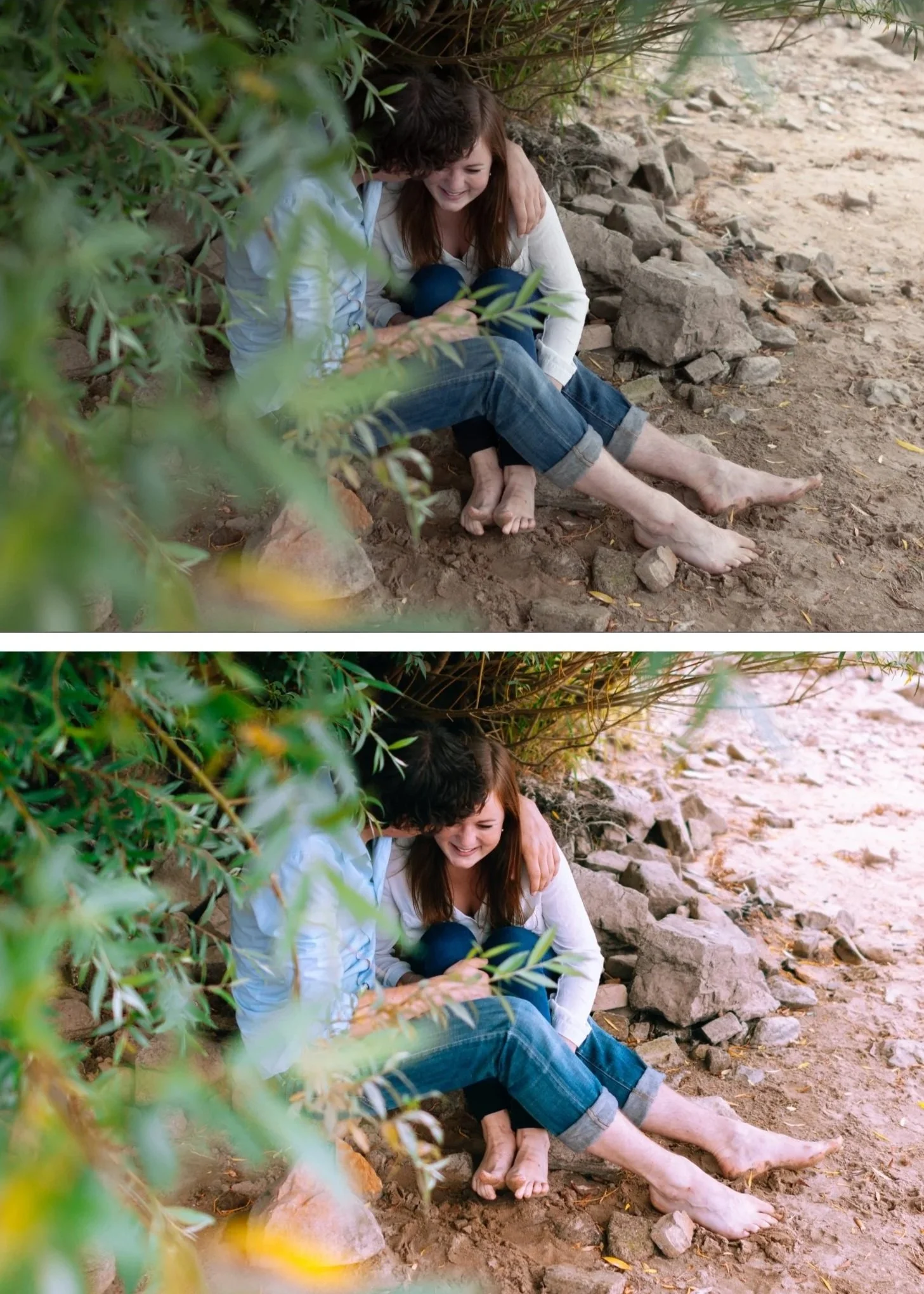
What film presets actually do
A film preset saves a specific set of Lightroom adjustments — tone curve, color grading, HSL color settings, grain, clarity — and applies them to any photo in one tap or click.
A good film preset replicates the color science of analog film photography: lifted blacks, soft highlight roll-off, organic grain, muted color, and warm shadow toning. Applied to a correctly exposed photo with a fixed white balance, the result looks like analog film rather than digital processing.
What it does not do: change composition, fix exposure errors more than 2-3 stops, or create interesting photography from technically correct but visually empty photos.
When film presets are worth it
You edit consistently. A preset is most valuable when applied to every photo in a gallery. Fifty travel photos edited with the same preset look like a coherent visual identity. Applied randomly to ten different photos, a preset adds variety, not style.
You want professional film quality without manual editing expertise. Building the film look manually — lifting blacks, creating the tone curve, adding grain, calibrating color grading — takes 5-10 minutes per photo and requires understanding each adjustment. A preset does this in one click.
You shoot in varied lighting. A calibrated preset system with variations for different lighting conditions produces consistent film quality across outdoor daylight, overcast, golden hour, and indoor photography. Editing each condition manually without a system creates inconsistency.
Time matters. A 400-photo wedding gallery edited with a calibrated preset system takes 4-6 hours. Without a system, the same gallery can take 15-20 hours. The time value of a good preset system at professional photography rates is significant.
When film presets are not worth it
You apply a new preset to every photo. Presets work through consistency. Switching between fifty random presets creates visual chaos, not style.
You expect the preset to fix everything. A preset applied to a badly exposed, incorrectly white-balanced photo looks wrong. The preset adds its color quality on top of whatever the photo already is. Fix the foundation first.
You only edit occasionally. If you take ten photos a month and edit them casually, the difference between a manual edit and a preset is minimal. The time-saving value is only significant at scale.
Free presets vs paid presets
Free presets are the right starting point. The free A6 and M5 presets from The Editing Studio are genuine professional quality, not simplified demos. Download both, apply them to twenty of your photos, and see which direction feels more right.
Paid preset collections add two things free presets do not: calibration across multiple lighting conditions, and more variations within the same color philosophy.
One free preset works in one scenario. A collection of six to ten calibrated presets on the same color philosophy covers bright outdoor, overcast, golden hour, indoor, and low light — all looking visually related.
If you always shoot in similar conditions and one free preset looks right, it may be enough. If you shoot varied conditions and want consistent film quality across a full gallery, a calibrated system is worth the investment.
Full comparison: Free Presets vs Paid Presets
Are presets better than manual editing?
This is the wrong question. Presets are a form of manual editing — they apply the same adjustments a skilled editor would make manually, faster and more consistently.
Understanding what the manual film look technique does makes you a better preset user. When a preset does not look right on a specific photo, knowing which sliders to adjust and why means you can fix it in 30 seconds rather than fighting it randomly.
Full manual technique: How to Make Photos Look Like Film Without Presets
The test before buying
Download the free A6 and M5 presets. Apply both to twenty of your photos — a mix of outdoor, indoor, and portrait if possible. One direction will feel immediately more right than the other.
If neither feels right, the direction is wrong rather than the quality. Look at photographers whose editing you admire and identify which direction they use — clean analog, moody cinematic, bright and airy, or muted vintage. Then find a free preset in that direction to test.
Buy only after testing the direction works for your photography.
FAQ
Are cheap presets as good as expensive ones?
Price does not equal quality. A well-calibrated $27 bundle from a specialist preset creator is significantly better than a $99 pack of random filters from a mass market shop. Test before buying regardless of price.
Do film presets work on all cameras?
Yes. A preset applies the same adjustments regardless of camera brand. The starting point differs — Sony, Fuji, Canon, and Nikon all have different color science — but the preset calibration handles this. Full guide: Best Lightroom Presets for Sony Cameras 2026
Do film presets work in Lightroom Mobile for free?
Yes. Preset installation and application is free in Lightroom Mobile. No Creative Cloud subscription needed.
