Beginners Guide to Film Presets
Beginners Guide to Film Presets
Film presets are the fastest way for a new photographer to get consistent, professional looking results in Lightroom. They are also one of the most misunderstood tools in photography editing, which leads to disappointment when expectations do not match what a preset actually does in practice.
This guide covers what film presets are, what they can and cannot do, how to install and apply them correctly, and how to use them as a learning tool rather than as a permanent shortcut around understanding Lightroom.
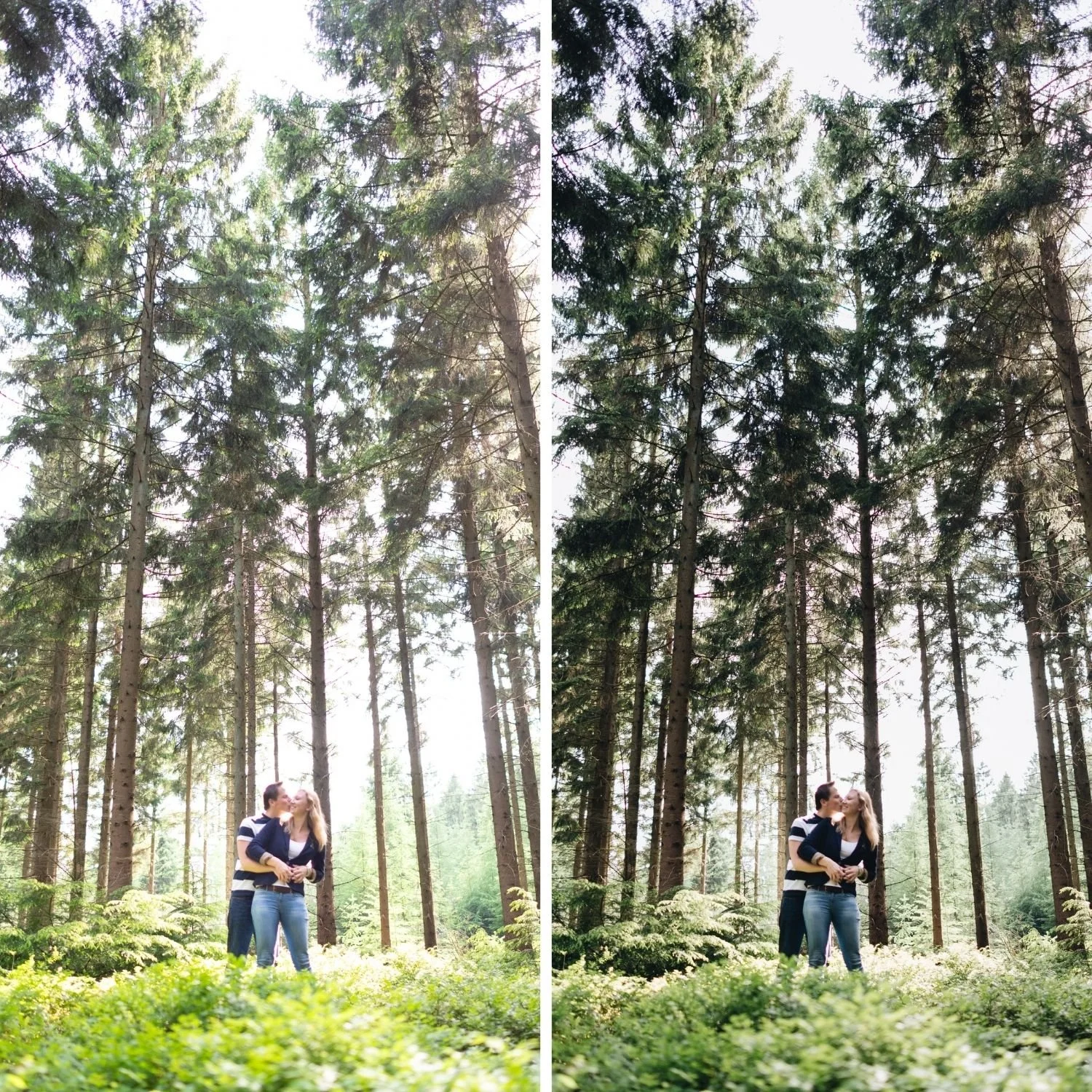
What a Film Preset Actually Is
A film preset is a saved set of Lightroom adjustments. When you apply it, it simultaneously sets values for Exposure, White Balance, the Tone Curve, all eight HSL color channels, Color Grading, Clarity, Texture, Grain, and every other control in the Develop module. Instead of making thirty individual adjustments to reach a specific look, you apply the preset and all thirty adjustments happen in one action.
The film part of the name means the adjustments are calibrated to recreate the visual properties of analog film photography rather than to apply an arbitrary color effect. Film has specific measurable characteristics: shadows that never reach pure black because of the physical density of the film base, highlights that compress gradually rather than clipping abruptly, muted and organic color rendering that differs from digital sensor output, and grain texture from the silver halide crystals in the emulsion. A well built film preset addresses each of these deliberately rather than simply adding warmth and calling the result film. How to Create a Natural Film Look in Lightroom breaks down each of these properties and the exact adjustments that produce them.
What Presets Cannot Do
A preset cannot fix a badly exposed photograph. If highlights are clipped to pure white in the original file, that information was never recorded and no amount of post processing recovers it. If the photograph is severely underexposed, the preset amplifies sensor noise alongside the image detail.
A preset cannot fix composition, focus, or timing. It adjusts color and tone only. Everything that happens before the shutter opens is entirely outside its scope.
A preset cannot make every photograph look identical to the sample images that sold you on it. Sample images show the preset applied to the creator's photographs in specific lighting conditions with a specific camera. Your photographs have different starting points, which produces different results even with identical adjustments applied.
Understanding these limits before buying prevents the most common source of frustration with purchased presets.
Installing Your First Preset
Presets come in two file formats. DNG files install in Lightroom Mobile on iOS and Android. XMP files install in Lightroom Classic on desktop. Most quality preset collections include both formats in the same purchase.
For Lightroom Mobile, import the DNG file as a photograph, open it, tap the three dot menu in the top right, and select Create Preset. Name it and save. For Lightroom Classic on desktop, open the Develop module, right click in the Presets panel, select Import Presets, and choose the XMP files from your download folder.
The technical difference between the two formats and when each applies is covered in more detail in DNG vs XMP Presets, which is worth reading if you plan to work across both mobile and desktop.

The Three Step Beginner Workflow
The simplest effective workflow has three steps and produces good results while you are still learning what everything else in Lightroom does.
Step one is white balance. Before applying the preset, set the Temperature so that warm things look warm and neutral things look neutral. For outdoor daylight photographs, a Temperature around 5,200 to 5,500K is a reliable starting point. This step matters more than most beginners expect, because the preset's color calibration assumes a reasonable starting white balance. Applying a warm preset to a file that is already too warm produces orange results regardless of how well the preset is built.
Step two is applying the preset. Tap or click it. Everything applies at once.
Step three is Exposure. Adjust until the photograph looks correctly bright. Most photographs need a small adjustment, typically between positive 0.3 and negative 0.2.
That is the entire workflow for the first few weeks. Resist the temptation to adjust everything else. The preset is handling the aesthetic decisions. Your job is white balance and brightness.
Using Presets to Learn Lightroom
The most valuable thing a beginner can do with a preset is examine what it changed. After applying a preset that produces a result you like, spend five minutes opening each panel in the Develop module to see what moved.
Open the Tone Curve. Notice whether the bottom left shadow point has been lifted and by how much. Notice the shape of the curve through the midtone range. This shows you how the preset builds its contrast structure without using the Contrast slider.
Open the HSL panel. Notice which color channels have reduced Saturation and by how much. Notice any Hue shifts, particularly in the Green channel. This shows you how the preset manages outdoor color and skin tones.
Open Color Grading. Notice the Highlight Hue and Saturation values. This shows you where the warmth in the preset actually lives and why it reads as light rather than as a filter.
Doing this repeatedly across different presets teaches Lightroom faster than most structured tutorials, because you are studying working examples applied to your own photographs rather than abstract explanations applied to someone else's.
Choosing Your First Preset Collection
Start with something versatile rather than something dramatic. Heavy fade presets and extreme warm presets look impressive on carefully selected sample photographs and fail conspicuously across the range of everyday photographs that a beginner's library actually contains.
The free Analog Film preset is the appropriate first preset for most beginners. It is a versatile warm film baseline that handles outdoor, indoor, portrait, and travel photography without requiring per photograph customization. Use it on everything for a few weeks before buying anything else.
When you are ready to expand, Best Lightroom Presets for Beginners covers what to look for and which collections suit new photographers, and How to Choose the Right Lightroom Preset for Your Photography Style covers the selection framework in more depth for when your photography develops a clearer direction.
FAQ
Do I need to pay for Lightroom to use presets?
No. Lightroom Mobile is free on iOS and Android and supports preset installation and application. Advanced features including the full Tone Curve require a subscription but the core preset workflow does not.
How many presets do I actually need?
One, to start. Understanding one preset well and applying it consistently produces better results than owning fifty and applying them inconsistently across a gallery.
Will presets work on my phone photographs?
Yes. Apply at 80 to 85 percent strength on phone files rather than full strength, to compensate for the processing the phone camera applies before the file reaches Lightroom.
Start with one calibrated preset:
Download the free Analog Film preset and use it as your only preset for the next three weeks. Apply the three step workflow to every photograph you edit.
When you are ready for a complete collection, the Analog Film Archive provides ten calibrated looks. The Studio Archive at $89 includes every collection for photographers who want the full range from the start.
