Film vs Digital Color Science Explained
Film vs Digital Color Science Explained
Film photography feels different from digital photography. Every photographer who has worked with both has experienced this, and most can describe the difference in subjective terms: film feels warmer, softer, more dimensional. But the reasons for these differences are technical, and understanding them specifically is what allows you to recreate them deliberately in Lightroom rather than searching for a preset that accidentally produces the feeling you are looking for.
The differences between film and digital photography come from fundamentally different approaches to capturing and recording light. Digital sensors are precision instruments designed for accuracy and dynamic range. Film emulsions are chemical systems designed for specific aesthetic responses to light. These different design philosophies produce visually distinct results that persist even when both are correctly exposed and processed.

The Linear Response Problem in Digital
Digital sensors have a linear response to light within their dynamic range. Each additional unit of light hitting the sensor produces the same increase in the recorded signal, within the sensor's working range. This technical accuracy is one of digital photography's greatest advantages for professional work: it captures more true dynamic range than film and provides more latitude for correction in post.
The problem is that human visual perception is not linear. The human eye has a non-linear response to light, with much higher sensitivity to differences in dark areas than in bright areas. Film emulsions, through their chemical behavior, happen to approximate this non-linear response more closely than digital sensors do. The result is that film photographs can look more natural to human perception than technically accurate digital photographs, particularly in how they handle the extremes of the tonal range.
Highlight Roll-Off: The Most Visible Difference
The most immediately visible difference between film and digital is in how they handle overexposure. Digital sensors record accurately until they reach their maximum capacity, then clip abruptly to pure white. There is no gradual transition. Areas that were just within the sensor's range record normally, and areas just outside it record as identical pure white.
Film emulsions have a gradual roll-off in their response curve as they approach maximum density. The characteristic curve of film flattens at the top (the shoulder) rather than stopping abruptly. This means that film photographs in bright conditions have a gradual compression of the brightest values into a small tonal range, producing the luminous, creamy highlight quality that is one of the most recognizable properties of film photography. The highlights retain texture and tonal variation rather than becoming a featureless white.
In Lightroom, the Tone Curve can approximate this shoulder behavior by pulling the top-right highlight point downward from its maximum position. Moving it from output 255 to output 220 to 230 creates a gradual compression in the upper tonal range that references the shape of film's characteristic curve at the highlight end. This is the technical source of what photographers describe as "soft highlights" or "film-like highlight roll-off."
Shadow Floor: The Second Structural Difference
Film emulsions have an inherent physical density in their base and anti-halation layers that prevents the darkest areas of a film photograph from reaching absolute zero density. This creates a shadow floor: the darkest values in film photographs are still slightly above pure black, producing the dimensional shadow quality where dark areas have presence and texture rather than becoming entirely absent.
Digital sensors can and do record absolute zero signal in fully unlit areas, producing pure black with no shadow detail. This technically accurate recording produces the harsh, absent quality in digital shadows that film photography does not have.
The Lightroom Blacks slider and Tone Curve shadow point can approximate the film shadow floor by lifting the darkest values slightly above zero. Lifting the Tone Curve shadow point to output 15 to 20 creates the shadow floor that film's base density produces, giving dark areas the dimensional presence of film photography.
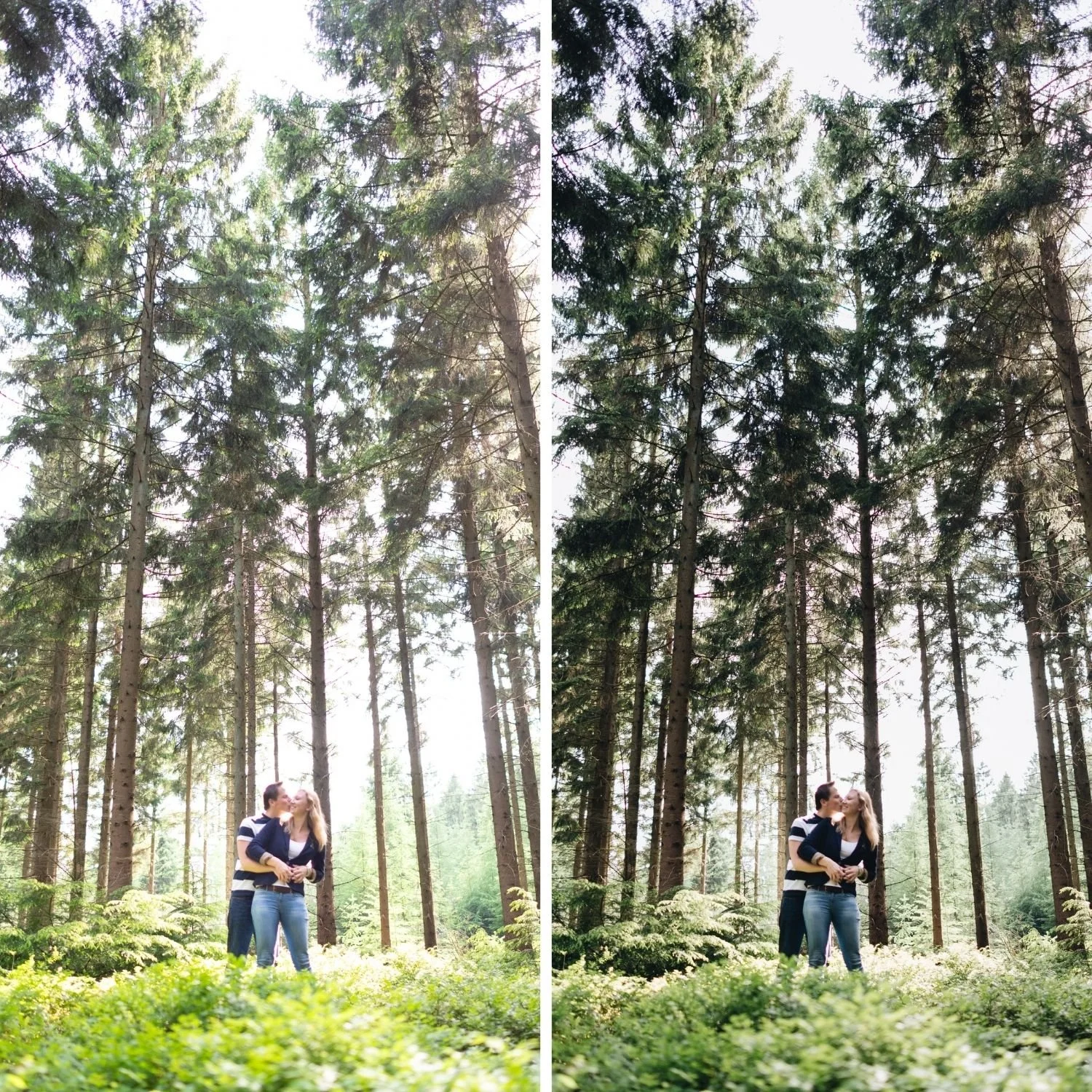
Color Rendering: Why Digital Greens Go Neon
Film emulsions have spectral sensitivities that differ from digital camera sensors. The sensitivity curves of film to red, green, and blue light are shaped by the specific dyes used in the emulsion layers, which were developed through decades of refinement toward aesthetically pleasing color rendering. Digital sensors have spectral sensitivities shaped by the silicon photodiode response and color filter array, which are optimized for technical accuracy rather than aesthetic pleasantness.
One of the most consistent differences is in green channel rendering. Digital cameras render outdoor vegetation with a high-saturation, slightly blue-shifted green that does not correspond to how human vision perceives the same scene. Film emulsions rendered greens with a warmer, more organic quality that aligned more closely with how outdoor environments actually look to human observers.
The practical consequence for Lightroom editing is that green channel reduction is the most impactful single adjustment for making digital photography look more like film. Reducing Green Saturation by 15 to 25 and shifting Green Hue slightly toward yellow removes the neon digital quality and replaces it with the organic outdoor color rendering of film photography.
Skin Tones: Stability Across Lighting
Film photography had a reputation for rendering skin tones consistently across varied lighting conditions because the spectral sensitivity curves of portrait film stocks were specifically calibrated toward the orange and red range where human skin tones live. Digital cameras render skin differently across lighting conditions because the sensor's accurate capture of different light sources produces different color casts that affect skin along with everything else.
This is why skin tones in digital photography can be warm in afternoon light, cool and grey in shade, and orange under tungsten without the photographer doing anything differently. Film photography had its own white balance variations but the specific spectral sensitivities of portrait film stocks moderated these shifts in a way that consistently produced warm, present skin.
In Lightroom, managing the Orange channel (Saturation negative 10 to negative 20, Luminance positive 5 to positive 15) along with careful white balance work produces the stable, warm skin rendering that photographers associate with film photography.
Why Understanding This Matters for Preset Selection
Photographers who understand the technical differences between film and digital know exactly what a preset needs to do to produce genuine film-like results. A preset that only adds warmth and grain is not recreating film color science. A well-calibrated preset addresses all of the properties described above: highlight roll-off through Tone Curve structure, shadow floor through the shadow point, organic outdoor color through green channel management, and stable skin rendering through orange channel calibration.
The difference between presets that produce convincing film results and presets that produce filtered digital results is whether the calibration addresses these underlying structural differences or simply adds surface-level warmth.
FAQ
Is film really better than digital for photography?
Neither is objectively better. Digital is more accurate, more flexible, and technically superior in most measurable respects. Film has aesthetic properties that many photographers find more visually pleasing, particularly in highlight behavior and skin rendering. The goal for most photographers is not to replace digital with film but to bring the aesthetic properties of film into digital post-processing.
Can any digital camera produce film-like results?
Yes. The film aesthetic comes from post-processing adjustments rather than from the camera itself. All digital cameras produce the same adjustable RAW or JPEG starting material. The editing calibration applied in Lightroom determines the result.
Why does my edit still look digital after applying a film preset?
Usually because one or more digital qualities remains unaddressed. The most common remaining issues are greens that are still too vivid, blues that are still too saturated, or highlights that are still clipping. Working through these channels specifically produces more convincing results.
Experience the film color science approach directly:
Download the free Analog Film preset and compare the Tone Curve, HSL panel, and Color Grading settings with the properties described in this guide to understand how the technical differences between film and digital are addressed in a calibrated preset.
For complete film color science applied across varied lighting conditions and photography genres, the Studio Archive at $89 contains 130 presets built on the same calibration principles.
