Muted Lightroom Preset — Complete Guide (2026)
Muted Lightroom Preset — Complete Guide (2026)
Muted editing is the opposite of vivid. Where most photography editing pushes color toward saturation and vibrancy, muted editing pulls it back — creating a refined, desaturated quality that feels sophisticated rather than processed.
It's one of the defining aesthetics of 2024-2026 — driven by the old money trend, quiet luxury fashion, and a general reaction against the oversaturated filters that dominated the previous decade.
This guide covers the exact technique for muted editing in Lightroom and which presets deliver the most consistent results.
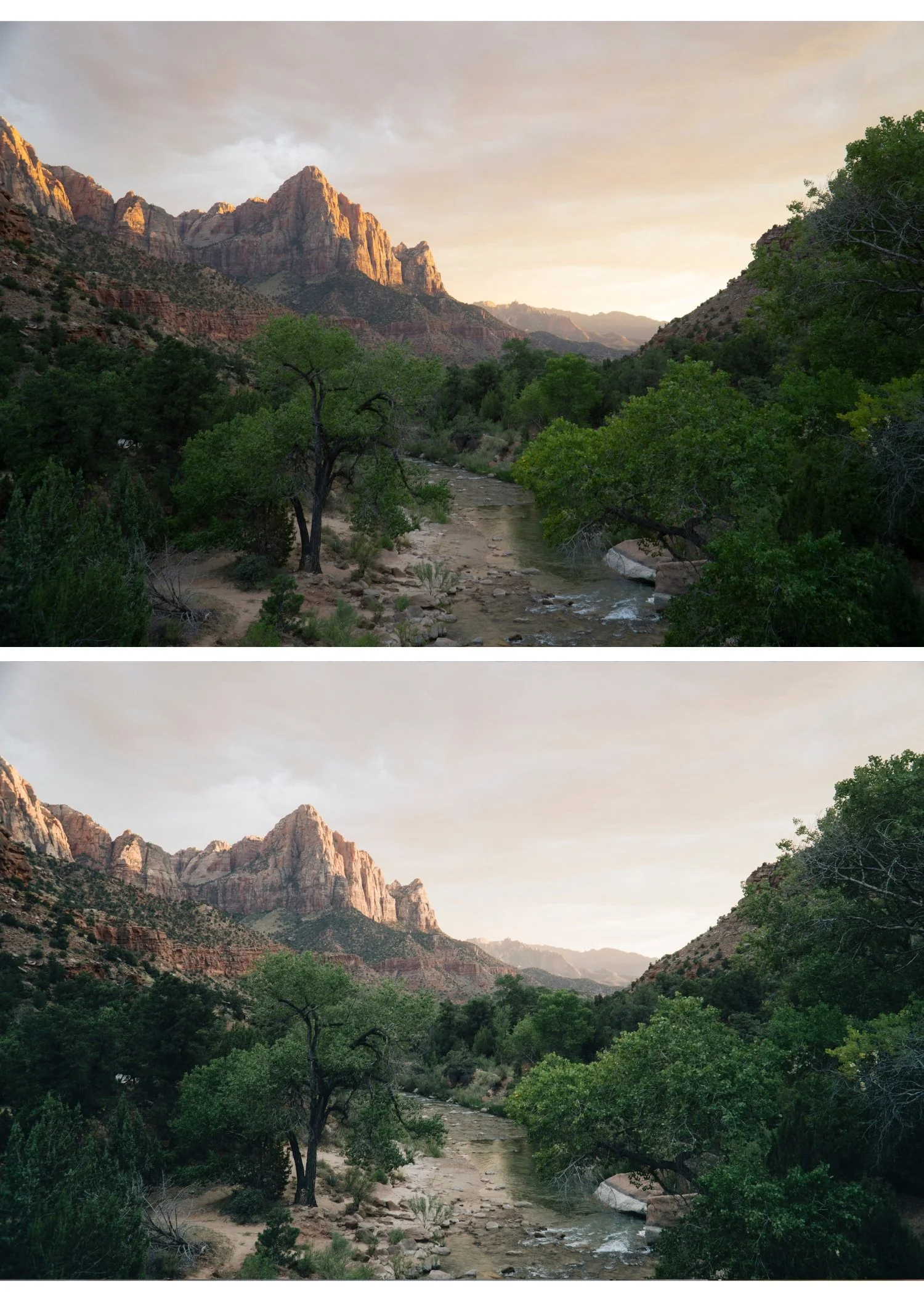
What is the muted look?
Muted editing reduces colour saturation across the image while maintaining tonal depth and contrast. It's not the same as faded — faded lifts blacks and reduces contrast. Muted specifically targets colour saturation while keeping the tonal structure intact.
Characteristics of good muted editing:
Reduced overall saturation without looking grey or lifeless
Colours that feel like they belong to quality film rather than a digital image
Soft contrast that supports rather than competes with the muted palette
Natural skin tones within the desaturated palette
A refined, considered quality
What muted is not:
Grey and flat — muted has depth, just less colour
Black and white — muted retains colour, just quieter
Faded — faded lifts blacks specifically, muted targets saturation
Exact Lightroom settings for muted editing
Basic panel:
Exposure: 0 to +0.2
Contrast: -15 to -25
Highlights: -20 to -30
Shadows: +10 to +20
Whites: -10 to -20
Blacks: +10 to +20
Presence:
Texture: -5 to -10
Clarity: -10 to -15
Vibrance: -20 to -30 (the most important slider for muted)
Saturation: -10 to -15
HSL — Saturation (reduce all channels):
Red: -10 to -15
Orange: -5 to -10 (keep skin relatively natural)
Yellow: -15 to -20
Green: -20 to -30
Aqua: -15 to -20
Blue: -20 to -25
Purple: -10 to -15
Magenta: -10 to -15
Color Grading:
Keep everything very subtle — saturation 5-10 maximum
Shadows: very slight warm or cool depending on preference
Highlights: neutral
Tone Curve:
Gentle S-curve — muted needs some tonal structure
Slightly lifted black point
Effects:
Grain Amount: 10-20 (subtle)
Size: 20-25
Roughness: 35-45
Muted vs faded vs desaturated — the differences
These three terms are often used interchangeably but create different results in Lightroom.
Desaturated — reduce Saturation or Vibrance only. Colour becomes grey. Simple but often looks like a mistake rather than a choice.
Faded — lift Blacks significantly (+25-35) and reduce Contrast. Creates a matte, aged quality. Colour remains but feels soft and aged.
Muted — reduce colour saturation specifically across HSL channels while maintaining tonal depth. More targeted than desaturation, less aged than faded.
Muted + slight fade — combining both is the modern approach. Reduce HSL saturation + lift Blacks slightly (+10-15) + reduce Contrast. This is what the Luxury Archive presets do.
When muted editing works and when it doesn't
Works best for: Architecture and interiors — muted colour lets texture and form speak without colour competing.
Fashion and lifestyle with neutral clothing — muted editing enhances the quality of neutral fabrics and tones.
Urban and street photography — city environments often have complex, competing colours. Muting them creates cohesion.
Travel in historic or heritage environments — muted colour suits the aged, refined quality of older architecture and landscapes.
Portrait photography with neutral backgrounds — muted works for portraits when the background doesn't compete with skin tones.
Struggles with: Vibrant seasonal content — spring and summer photography often relies on vivid colour. Muting it can feel wrong and fight against the natural energy of the season.
Heavily colourful environments — markets, festivals, colourful architecture. Muting removes what makes these subjects interesting.
Portraits where warmth and vitality are the goal — heavily muted portraits can look cold and clinical.
The Luxury Archive — muted preset system
The Luxury Archive (LV-Series) is the most dedicated muted preset collection — three presets built around quiet luxury editorial tones.
LV1 — Muted Clean: Balanced contrast, slightly desaturated, sophisticated aesthetic. The most versatile muted preset.
LV2 — Quiet Cool: Deeper with cool undertones and a quiet, refined feel. The most distinctly muted and luxury of the three.
LV3 — Warm Muted: Subtle warmth within the desaturated palette. For environments where the cool neutrality of LV2 feels too cold.
$4.98 per preset.
Free muted starting point
The free A6 preset is clean and minimal — a good starting point for muted editing. After applying, reduce Vibrance to -25 and pull all HSL Saturation channels down by -10 to -15. That moves it firmly into muted territory.
FAQ
What's the difference between muted and desaturated in Lightroom?
Desaturation reduces all colour uniformly using the Saturation slider. Muted editing uses the HSL panel to reduce specific colour channels individually — giving more control and a more refined result. Muted typically also includes soft contrast and slight tonal adjustments that pure desaturation doesn't.
How do I make my photos look muted without looking grey?
The key is reducing HSL Saturation channels individually rather than using the global Saturation slider. Keep Orange Saturation relatively natural (-5 to -10) so skin tones stay warm. Add subtle Color Grading to shadows for depth. And maintain some tonal contrast — muted without contrast looks grey.
Is muted the same as old money aesthetic?
They overlap significantly. The old money aesthetic uses muted editing as its foundation, combined with clean whites and refined contrast. Old money is muted plus specific compositional and styling choices. See: Old Money Aesthetic Lightroom Preset Guide
Does muted editing work for Instagram?
Yes — the muted aesthetic has been consistently popular on Instagram since 2022. It works particularly well for lifestyle, fashion, and travel content targeting an audience that values refined aesthetics over vivid colour.
