Image 1 of 1
V-Series Modern Classic | V2 Velvet Archive for Lightroom & Mobile

-
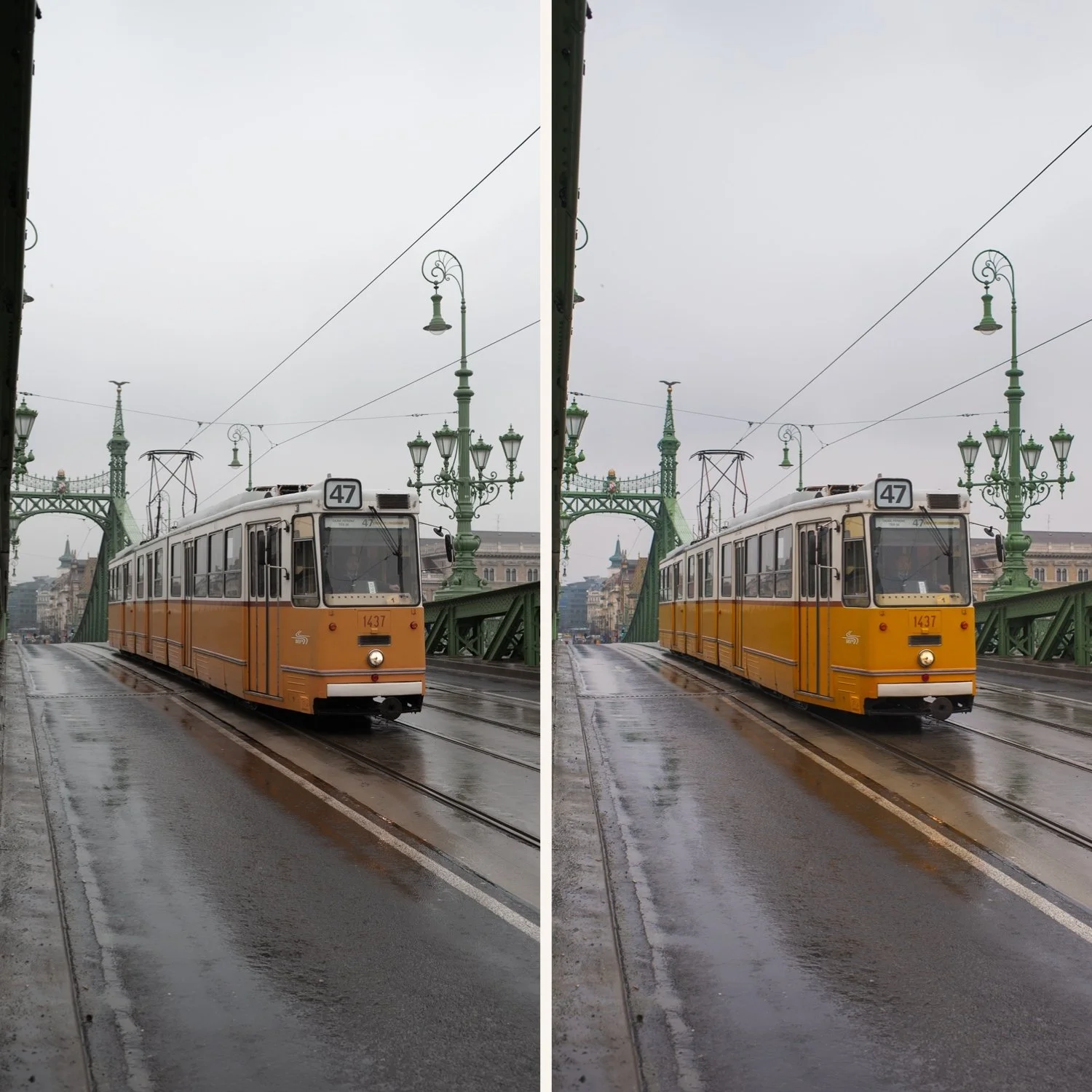
Slate-Tinted Shadows V2 replaces warm or muddy blacks with a clean, cool-charcoal fade, adding an instant "designer" feel to your compositions.
Neutralized Warmth It excels at taming unwanted yellow and orange casts, making interiors and skin tones look balanced and sophisticated.
Ethereal Morning Light The preset creates a "chilled" atmosphere, making even midday shots look like they were captured in the soft, blue light of a quiet morning.
Clean Minimalist Palette By pulling colors toward a cool-neutral spectrum, V2 creates a highly consistent and professional look for a modern portfolio.
-
1x V2 Cool Velvet Matte Preset for Lightroom MOBILE (DNG file for iOS & Android).
1x V2 Cool Velvet Matte Preset for Lightroom DESKTOP (XMP file for Mac & Windows).
Easy Step-by-Step Installation Guide.
-
This preset captures the aesthetic of professional "Tungsten-balanced" film when shot in natural daylight and processed for a matte finish. It is the professional answer for those who want their work to feel modern and detached from "warm" digital trends. By emulating the characteristic cool-color crossover and the soft, silver-like highlight roll-off of high-end cinematic emulsions—V2 ensures your photos possess a sleek, archival quality. It transforms digital files into frames that look like they were pulled from a minimalist Scandinavian design magazine.
-
The Foundation: V2 works best with neutral colors—whites, grays, blues, and blacks—and performs beautifully in diffused or "cold" light.
Apply V2: Watch as the frame takes on a sophisticated, cool-matte aesthetic with lifted, silk-like shadows.
Skin Balance: If the cool tones make skin look too "pale," use the Temperature slider to add a touch of warmth back; the matte shadow profile will remain.
Detail Control: Since V2 has a soft finish, use the Clarity slider if you want to bring back some "bite" to architectural lines or textures.
The Final Touch: Add Fine Grain to maintain that high-end, "printed on silk" archival texture.