Bright Summer Film Look in Lightroom
Bright Summer Film Look in Lightroom
The bright summer aesthetic is one of the most sought after looks in lifestyle and travel photography, and one of the easiest to get wrong in a specific and identifiable way. The intended result is light, airy, and luminous with genuine tonal depth underneath. The common result is flat, washed out, and grey, because the photographer lifted everything uniformly rather than lifting selectively.
The difference between airy and washed out comes down to where the lift happens in the tonal range and what stays anchored. Understanding this single distinction produces a consistently better result than any preset applied without it.
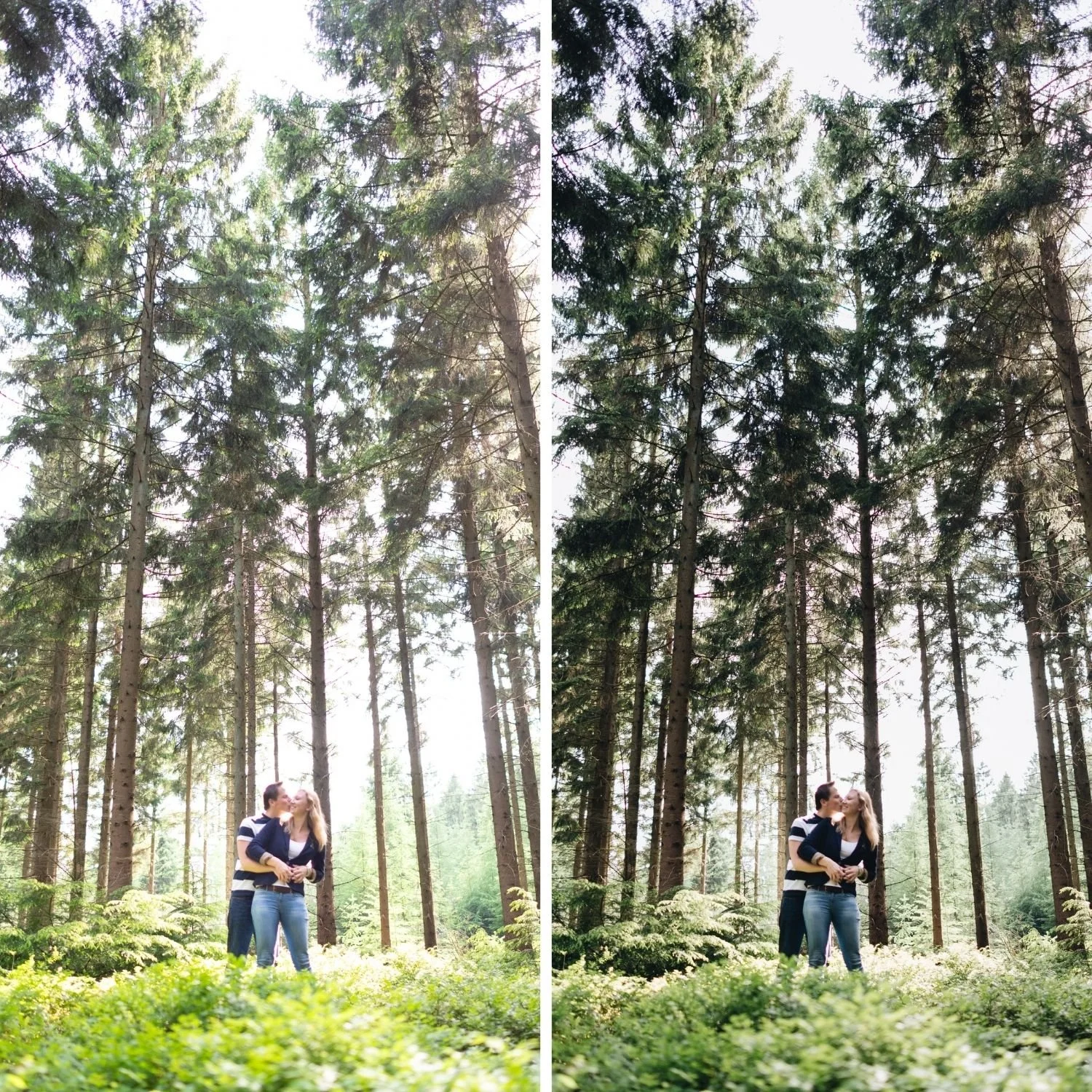
What Separates Airy From Washed Out
An airy photograph has lifted highlights, softened shadow depth, and a maintained black point. A washed out photograph has everything lifted including the black point, which removes the tonal anchor that gives the image dimension.
The technical description is that airy photographs have compressed tonal range in the upper half of the histogram while the lower end still reaches genuine density. Washed out photographs have compressed range across the entire histogram with nothing reaching either extreme, which is why they read as hazy rather than bright.
In practice this means the bright summer look lifts Shadows and Highlights while keeping Blacks only slightly raised. The temptation is to raise Blacks substantially because it makes the photograph look lighter immediately, but this is exactly what produces the flat result. How to Balance Contrast for a Soft Analog Look covers the distinction between soft contrast and absent contrast, which is the same principle applied more broadly.
Step One: Exposure and Highlight Structure
Set Exposure so the photograph reads bright, typically positive 0.2 through positive 0.5 from the camera meter. The bright summer look starts brighter than a standard film edit and the exposure decision is part of the aesthetic rather than a correction.
Pull Highlights to negative 25 through negative 45. This is what allows the photograph to be bright without the brightest areas clipping. Skin highlights, white clothing, bright sand, and open sky all need this protection in summer conditions. The technical reason this produces a film quality rather than simply darkening bright areas is covered in Highlight Roll-Off Explained.
Reduce Whites by negative 10 through negative 25.
Lift Shadows to positive 15 through positive 35. This is the primary lift that produces the airy quality, and critically it happens in the shadow range rather than at the black point.
Lift Blacks only to positive 5 through positive 12. Keeping this modest is what preserves the tonal anchor and separates the result from a washed out edit.
Step Two: White Balance
The bright summer look works with a neutral to marginally warm white balance rather than a heavily warm one. Set Temperature to 5,100 to 5,400K. Heavier warmth pushes the aesthetic toward golden hour rather than bright midday summer, which is a different look with different requirements.
Set Tint to positive 5 through positive 10 to counteract the slight green cast common in bright outdoor daylight.
Step Three: Colour Channels
Green Saturation reduction of negative 15 through negative 30 handles summer foliage, which sits at peak saturation in the season this aesthetic is built for. Shift Green Hue toward yellow by positive 5 through positive 10. Increase Green Luminance by positive 5 through positive 12 to keep foliage light rather than heavy, which supports the airy direction specifically rather than simply muting the colour.
Blue Saturation reduction of negative 10 through negative 20 keeps summer skies from going electric. Increase Blue Luminance by positive 5 through positive 10 for a lighter sky that supports the bright aesthetic rather than anchoring the frame with a deep saturated blue.
Orange Saturation reduction of negative 8 through negative 18 with Orange Luminance increased by positive 8 through positive 15 keeps skin warm and bright within the light palette. This combination matters more in bright summer editing than in most other directions because the elevated overall brightness can otherwise leave skin looking pale and flat.
Yellow Saturation reduction of negative 5 through negative 15 prevents warm summer light from reading as yellow across the frame.

Step Four: Tone Curve
Lift the shadow point to output 18 through output 26. Higher than standard film editing, lower than a full matte treatment.
Keep the midtone curve gentle. The bright summer look does not use pronounced midtone contrast, which would work against the softness that defines it.
Pull the highlight point to output 228 through output 238. The compression should be light, since the aesthetic depends on genuinely bright highlights rather than compressed grey ones. This is a meaningfully different curve shape from moody or cinematic editing, and Understanding Color Curves for Film Editing covers how the same curve controls produce very different results depending on where the points sit.
Step Five: Colour Grading and Finishing
Highlight Colour Grading with Hue 40 to 50 at Saturation 4 to 8. Light warmth in the bright areas without pushing the overall frame warm. Shadow Colour Grading close to neutral at Saturation 2 to 5, since cool shadows fight the warm bright direction rather than complementing it.
Clarity at negative 5 through negative 15 for the soft quality. Texture at 0 or slightly negative.
Grain at Amount 10 to 18 with Size 18 to 26. The bright summer aesthetic uses restrained grain. Heavy grain reads as inconsistent with the clean bright direction. The Role of Grain in Film Emulation covers the calibration ranges across different aesthetic directions.
Presets That Produce This Look
The Bright and Clean Archive is built specifically around this aesthetic. S-II Airy Lift is the most directly applicable preset, with lifted highlights and softened shadow depth calibrated together as a system. S-IV Pure Light pushes further toward high key for photographers who want maximum brightness.
The Summer Archive H5 Soft Summer provides a warmer interpretation of the bright summer direction, suited to photographers who want more colour presence alongside the airy tonal structure.
For the warmer, golden variation of summer editing rather than the bright clean direction, Warm Summer Film Look in Lightroom covers the Mediterranean approach with richer colour and deeper warmth.
FAQ
Why does my bright summer edit look grey?
The Blacks slider is lifted too far. Reduce it to positive 5 to positive 10 and compensate by lifting Shadows further instead. The black point is what keeps the photograph from going flat.
Should I overexpose in camera for this look?
Slightly, by a third to half a stop, provided highlights do not clip. Starting brighter gives the edit more room to work with. Clipped highlights cannot be recovered afterward.
Does this look work in overcast conditions?
Yes, and often better than in harsh direct sun. Overcast light is already soft and diffuse, which suits the aesthetic naturally. Less Highlights recovery is needed and the result is more consistent.
Try the bright summer approach on your own photographs:
Download the free Analog Film preset and apply the shadow lift and highlight protection described above.
For collections built around bright clean aesthetics, the Bright and Clean Archive covers six calibrated variations. The Studio Archive at $89 includes it alongside every other collection.
