How to Get the Film Look on Sony Cameras in Lightroom (2026)
How to Get the Film Look on Sony Cameras in Lightroom (2026)
Sony cameras produce technically precise, high-dynamic-range files with excellent detail. The one area where Sony consistently falls short for photographers who want a film look is color character Sony's rendering is accurate but clinical. It lacks the organic warmth, the muted color, and the natural imprecision of analog photography.
Film presets are the natural solution. But Sony files need specific preparation to get the best results. This guide covers the complete Lightroom workflow for film look photography on Sony cameras.

Understanding Sony's color science
Sony cameras have four characteristics that affect film preset editing.
Clinical, accurate color. Sony prioritizes color accuracy over aesthetic warmth. The result is precise but lacks the organic character of film or the warmth of Canon. Film presets add exactly what Sony lacks — character and warmth.
Vivid, slightly oversaturated output. Sony cameras boost saturation in processing. This means a preset is working on top of an already-vivid starting point. Reduce Vibrance -8 to -12 before applying any preset.
High-contrast rendering at the sensor level. Sony sensors have excellent dynamic range but their default rendering applies more contrast than Fuji or Nikon. Film presets that reduce contrast work naturally with Sony.
Strong green rendering. Sony's greens are vivid and slightly cyan-shifted. Green Hue toward yellow (+10 to +15) and Green Saturation -15 to -20 are essential Sony adjustments for outdoor photography.
Sony camera settings for film look results
Creative Style: Neutral
Go to Camera Settings, Creative Style, and change from Standard to Neutral. This reduces the contrast and saturation enhancement that Sony applies to JPEGs and RAW previews. The RAW data becomes a more neutral starting point for film editing.
Dynamic Range Optimizer: Off
Sony's DRO (Dynamic Range Optimizer) automatically adjusts shadows and highlights in a way similar to HDR compression. For film editing where you want full tonal control, disable DRO: Camera Settings 2, D-Range Opt., Off.
Alternatively use DRO Level 1 only — this is subtle enough to help with highlight recovery without significant tonal compression.
Auto White Balance Priority: Ambiance
Sony's Auto White Balance can cool down warm light aggressively. Change AWB setting to Ambiance priority — this preserves more of the natural warmth of golden hour and indoor scenes, creating a better starting point for warm film presets.
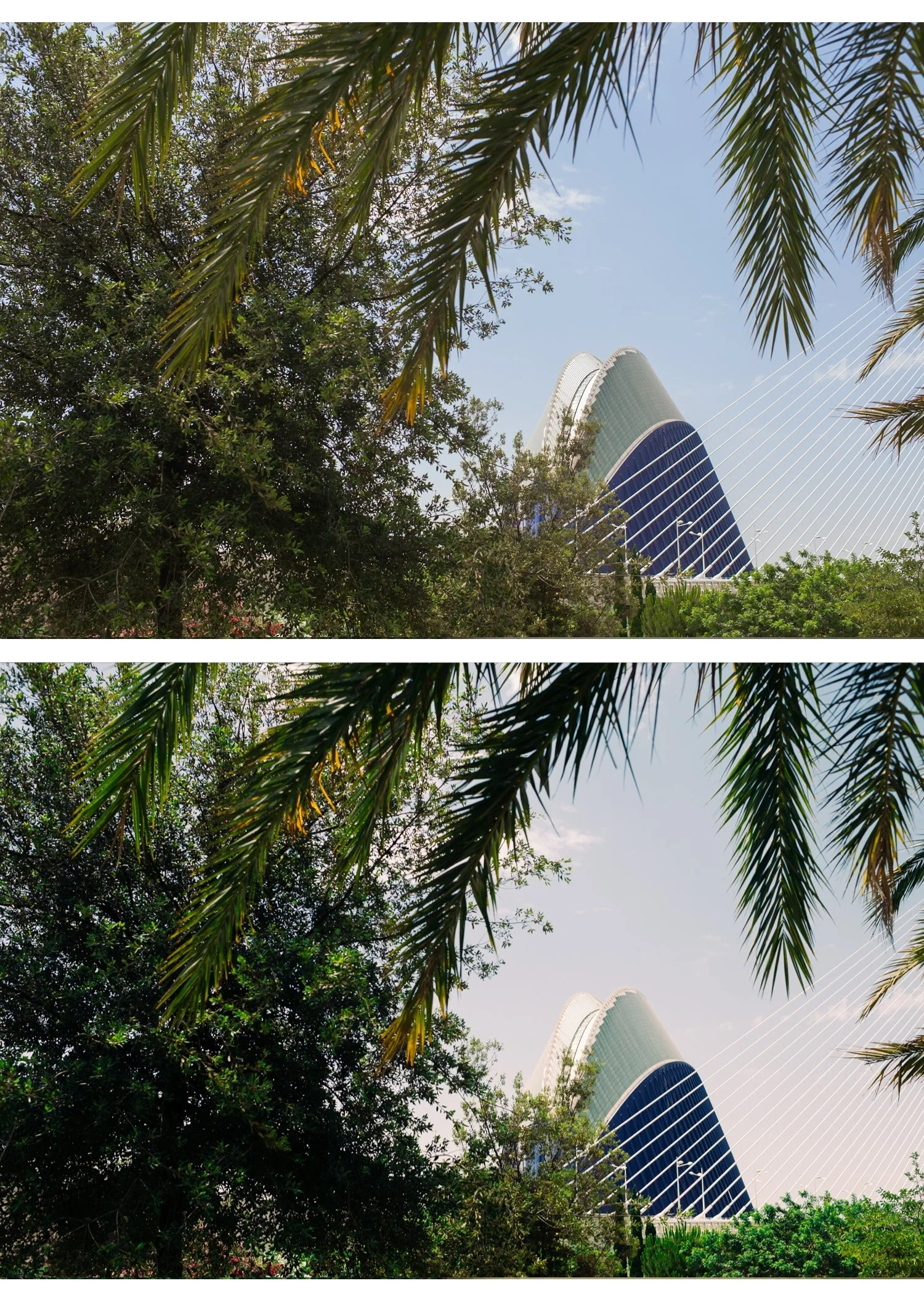
Lightroom workflow for Sony RAW files
Step 1 — Camera Calibration
Go to Camera Calibration at the bottom of the Develop module. Change from Adobe Color to Camera Standard or Camera Neutral.
Camera Standard is Sony's most neutral profile in Lightroom. Camera Neutral is flatter and useful if you want maximum film preset latitude. Either works — Camera Standard for most Sony photography, Camera Neutral for portrait work where skin accuracy is priority.
Step 2 — Reduce base saturation
Before applying any preset, add Vibrance -8 to -12. Sony's vivid starting point means the preset is working on an already-saturated foundation. Reducing Vibrance brings the starting point closer to what the preset assumes.
Step 3 — Protect highlights
Sony's sensors have excellent highlight latitude in RAW but still clip at extreme overexposure. For outdoor shots:
Highlights: -30 to -45 Whites: -15 to -25
Step 4 — Apply preset
For Sony RAW files on Camera Standard profile: apply preset at 90-95% strength. Sony's neutral-accurate rendering is close to what presets assume.
For Sony JPEG: reduce to 75-80%. JPEG processing adds contrast and saturation.
Step 5 — Sony-specific color adjustments
After applying:
Green Hue: +10 to +15 toward yellow. Sony's green is vivid and slightly cyan — shifting toward yellow creates the organic film green quality.
Green Saturation: -15 to -20. Reduces Sony's vivid outdoor greens.
Blue Saturation: -8 to -12. Sony skies can oversaturate. Modest blue reduction creates more natural aerial perspective.
Orange Saturation: 0 to +8. Sony's skin rendering is accurate but slightly cool. A small amount of Orange Saturation adds the film warmth without pushing orange.
Best Lightroom presets for Sony cameras
Clean natural film: Analog Film Archive A6 or A1. The neutral, clean quality of the A-Series complements Sony's accurate-but-clinical color science perfectly. A6 adds the organic warmth and film character that Sony lacks without fighting against the camera's precision.
Warm outdoor: Vesper Archive V1 Classic Film or V5 Golden Velvet. Warm, controlled, well-calibrated for Sony's vivid outdoor rendering.
Moody atmospheric: Moody Film Archive M4 or M5. Sony's high-dynamic-range files work excellently with moody presets — the latitude allows aggressive highlight protection and shadow depth that creates genuine cinematic quality.
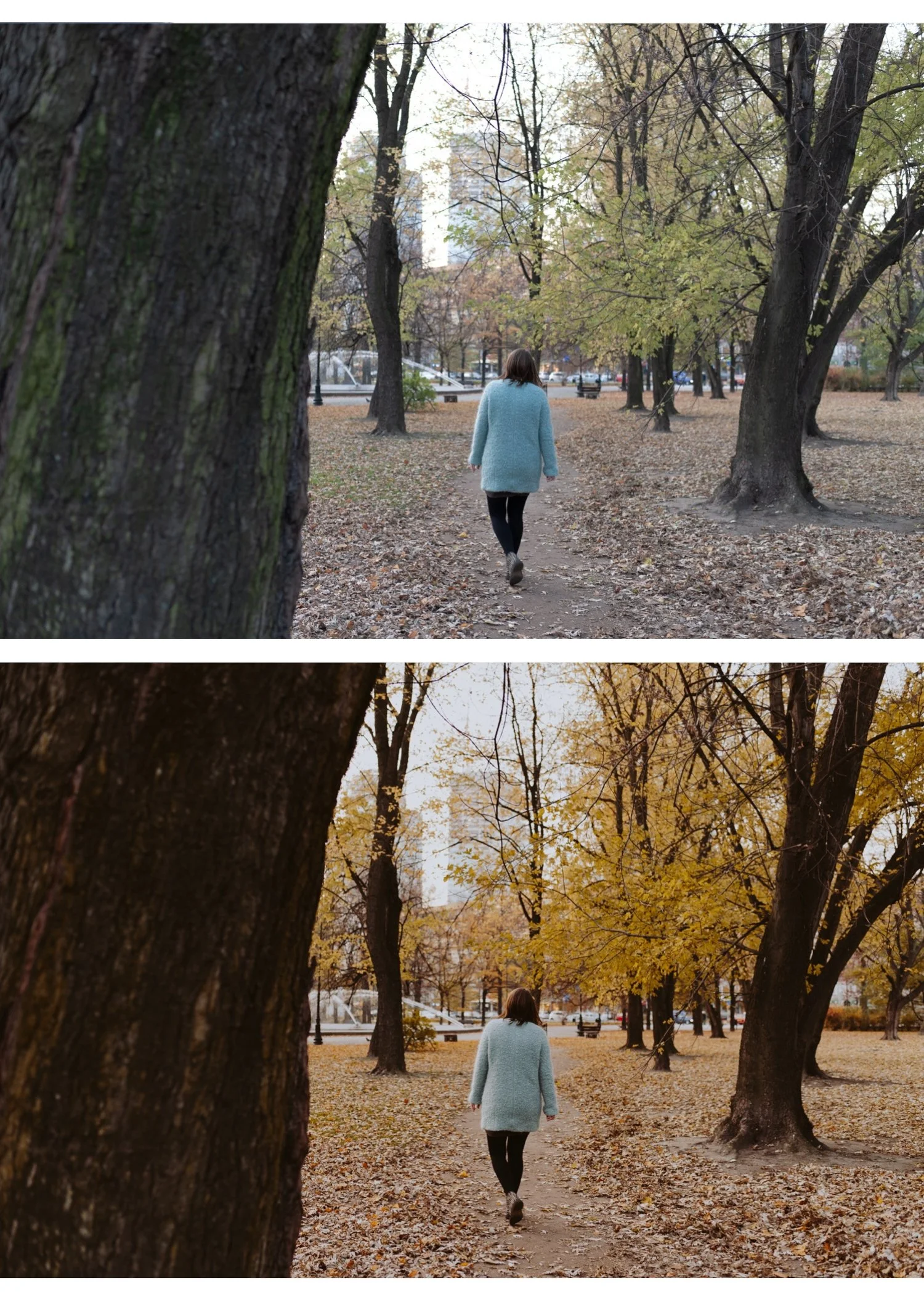
Portrait: Glow Portrait Archive G1. Sony's accurate skin rendering plus G1's skin-optimized calibration creates natural, flattering portrait quality.
Commercial and product: Luxury Archive LV1 or Analog Film Archive A6. Sony's color accuracy suits commercial work where precise, muted quality is wanted.
Sony by camera type
Sony A7 series (A7IV, A7C, A7III): Full frame, excellent dynamic range. Apply presets at 90-95% on RAW. The wide tonal latitude makes highlight protection very effective — pull Highlights -45 to -55 aggressively for outdoor shots.
Sony A6000 series (APS-C): Same color science as full frame but slightly less dynamic range. Highlights clip more readily. Pull Highlights -40 to -50 and be more conservative with shadow lifting on bright scenes.
Sony ZV-E10 and vlog cameras: Vivid color processing for video-first audience. Reduce Vibrance -12 to -15 before preset for this series. Camera Standard profile is essential.
Sony RX100 series (compact): More aggressive JPEG processing. Camera Standard profile, Vibrance -12, preset at 75% strength.
Sony vs Fuji vs Canon for film look
Sony: Most clinical starting point. Needs Vibrance reduction and green adjustments. Best results with clean neutral film presets.
Canon: Warmest starting point. Needs red reduction. Best results with neutral to warm presets.
Fuji: Best natural film starting point. Camera profiles restore simulation quality. Works with almost any preset.
For photographers specifically buying a camera for film look photography: Fujifilm is the easiest. Sony requires more preparation but produces excellent results with the right workflow.
FAQ
Why does my Sony film preset look desaturated?
Sony's vivid starting point means Vibrance and Saturation reductions in the preset land on an already-reduced foundation. Reduce Vibrance -8 to -10 before applying rather than after — the preset then adds its color character to a more neutral base.
Which Sony profile is best for film presets?
Camera Standard for general photography. Camera Neutral for portrait and skin-specific work. Both are significantly better than Adobe Color for film preset editing.
Do Sony RAW files give more latitude for film editing than JPEGs?
Yes significantly. Sony RAW files have 13-14 stops of dynamic range on the A7 series. The film preset's highlight protection creates a much more natural roll-off on RAW than on JPEG.
