Y2K Digicam Lightroom Preset — Complete Guide (2026)
Y2K Digicam Lightroom Preset — Complete Guide (2026)
The Y2K digicam aesthetic is everywhere in 2026. Blown highlights. Vivid, slightly off-colour tones. The specific quality of early 2000s point-and-shoot digital cameras — Samsung, Canon PowerShot, Casio EXILIM — that processed light in a way completely unlike modern cameras or film.
It's a distinctly digital aesthetic — not film, not analog, but the specific imperfections of early consumer digital cameras that are now being recreated deliberately on modern equipment.
This guide covers exactly how to recreate the Y2K digicam look in Lightroom.
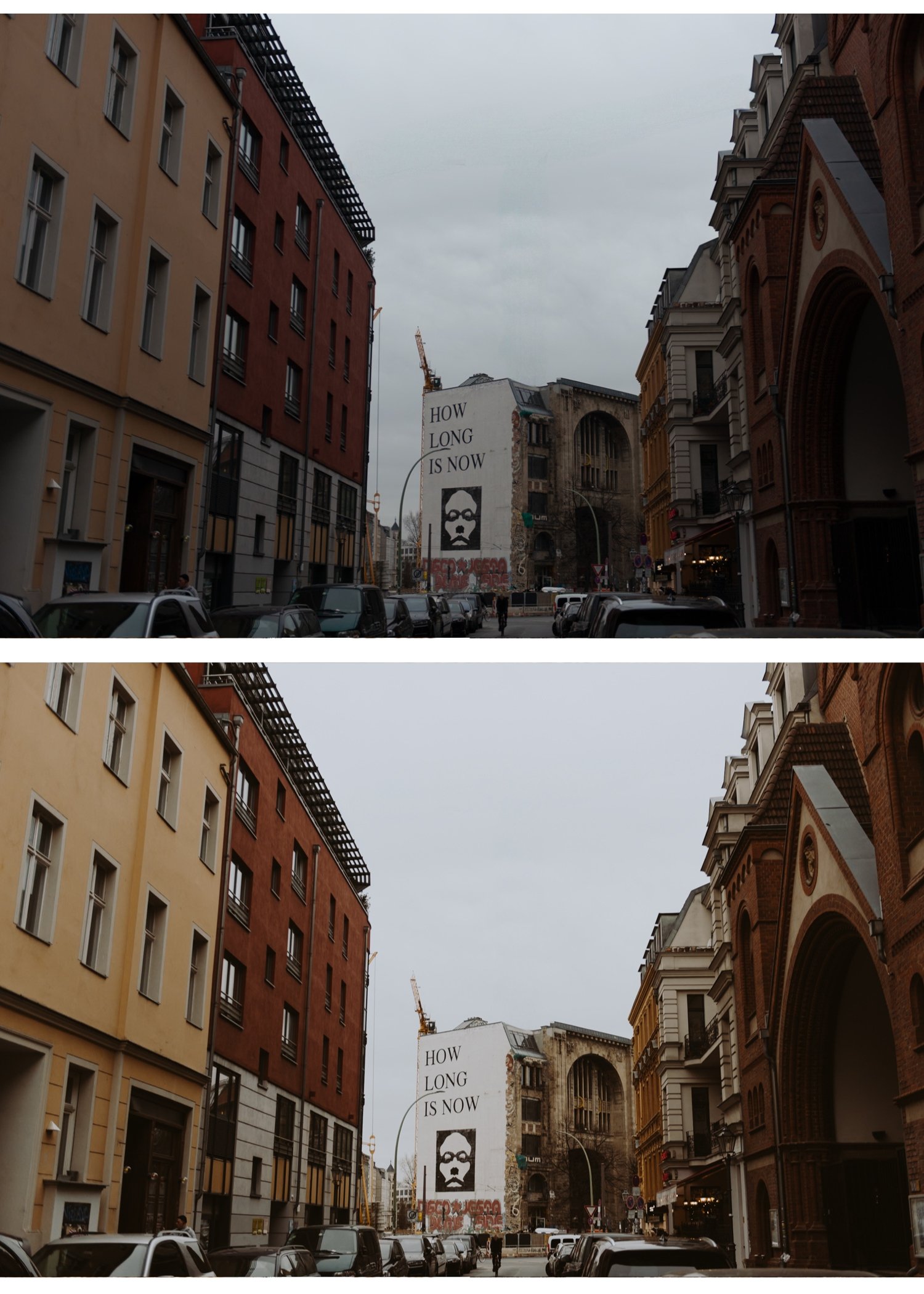
What makes the Y2K digicam look?
The early 2000s digital camera had specific technical characteristics that created the aesthetic:
Blown, clipped highlights — early digital sensors had very limited dynamic range. Bright areas clipped immediately to pure white. This is a defining characteristic — intentional highlight clipping is key.
Vivid, slightly off-colour tones — early camera processors pushed saturation aggressively and rendered colour in a specific way. Blues were very blue. Skin tones were slightly orange-pink. Greens were vivid.
Low resolution + digital sharpening — the aggressive sharpening of early digital cameras created a specific crunchy quality at edges.
Flash-heavy photos — point-and-shoot cameras used flash constantly. The flat, bright quality of built-in flash with its characteristic red-eye reduction is part of the aesthetic.
Date stamps — the yellow date stamp in the corner is the most recognizable Y2K digicam element. Lightroom can't add this automatically but it can be added in post.
Exact Lightroom settings for the Y2K digicam look
Basic panel:
Exposure: +0.5 to +1.0 (significantly brighter than normal)
Contrast: +10 to +20
Highlights: +20 to +40 (deliberately push highlights toward clipping)
Shadows: +10 to +20
Whites: +20 to +40 (clip whites intentionally)
Blacks: 0 to +10
Presence:
Texture: +10 to +20 (add digital crunchiness)
Clarity: +10 to +20 (increases micro-contrast — the digital sharpened look)
Vibrance: +15 to +25 (vivid colour is essential)
Saturation: +5 to +10
HSL — Saturation:
Blue: +20 to +30 (vivid early digital blues)
Green: +10 to +20
Orange: +5 to +10
HSL — Hue:
Orange: shift toward red (-5 to -10) — early digital skin rendering
Blue: shift toward cyan (+5 to +10)
Color Grading:
Highlights: slight warm pink — early flash photography quality
Shadows: neutral to very slight cool
Effects:
Grain: 0 to 10 (minimal — digicam was digital noise, not film grain)
If you want the noise quality: use Noise Reduction -20 to -30 in the Detail panel to introduce digital noise intentionally
Y2K digicam vs film — key differences
The Y2K digicam aesthetic is specifically anti-film. Understanding the differences helps you stay in the right direction.
Film:
Lifted blacks (never pure black)
Soft highlight roll-off (never clips)
Reduced saturation (organic color)
Negative clarity (removes micro-contrast)
Y2K Digicam:
Natural to slightly crushed blacks
Clipped highlights (intentionally blown)
Increased saturation (vivid digital color)
Positive clarity and texture (digital crunchiness)
If your Y2K edit has lifted blacks and soft highlights — you've accidentally made it look like film. Push highlights higher and let them clip.
When Y2K digicam works
Intentionally nostalgic content — the aesthetic is very specifically 2000s. It works when the nostalgia is the point.
Street photography — the raw, snapshot quality suits candid street work.
Party and social photography — the flash-heavy digicam look suits social scenes authentically.
Fashion with Y2K styling — low-rise jeans, velour tracksuits, butterfly clips. The aesthetic and styling work together.
Social media content targeting Gen Z nostalgia — the Y2K revival has been predominantly Gen Z driven. Content aimed at this audience performs well with this aesthetic.
The Nostalgic Digicam Set: the calibrated version of everything above
Everything in the settings section above, blown highlights, vivid saturation, positive Clarity and Texture, the cool leaning blue, is exactly what N1 and N2 from the Nostalgic Digicam Set already do. If you have been following along and building the look manually, these two presets are the same destination without the eleven sliders.
N1, Clean Modern is the direct match for the settings above: clean, bold, vivid colour with structured contrast, the punchy digital energy this whole guide describes. It is the most versatile of the two and the right starting point.
N2, Warm Modern applies the same digicam calibration with more warmth and colour depth, built for outdoor content in warm light where the punchy quality gets enhanced by natural light rather than fighting it.
The set is $27 for four presets, or $6.75 individually. N1 and N2 are the two that match this guide. The other two presets in the set, P2 and P5, do something different: a warm instant film look rather than the digicam aesthetic. If that softer, Polaroid adjacent direction is actually closer to what you pictured, Best Y2K Lightroom Presets covers the distinction between the two directions and which is which.
Free retro starting point
Download the free M5 preset as a warm, retro starting point. It doesn't do Y2K digicam automatically, apply it, then increase Highlights to +30, add Clarity +15, and push Vibrance to +20 to move it toward the digicam aesthetic.
This gets you close by hand. For the calibrated version with both the punchy digicam direction and the warm instant film alternative built in, the Nostalgic Digicam Set above covers both starting points properly rather than one preset stretched toward a look it was not built for.
FAQ
What is the Y2K digicam aesthetic?
The visual style of early 2000s consumer digital cameras — blown highlights, vivid oversaturated colour, digital sharpening crunchiness, and the characteristic flat quality of built-in flash photography. Being deliberately recreated in 2024-2026 as a nostalgia aesthetic.
How do I get the digicam look in Lightroom?
Increase Highlights and Whites to clip intentionally, add positive Clarity and Texture (+10-20), increase Vibrance (+15-25), and avoid the film-look adjustments (lifted blacks, negative clarity, reduced saturation) that would move it away from the digital aesthetic.
Is Y2K digicam the same as vintage?
No — vintage references aged film photography with warm, faded, organic tones. Y2K digicam references early digital cameras — vivid, clipped, digitally processed. They're opposite aesthetics.
Will the Y2K trend last? Trend content has a shorter lifespan than evergreen content. The Y2K digicam aesthetic has been building since 2022 and is at peak in 2026. Write and publish this content now while the search volume is high.
