Polaroid Lightroom Preset — Complete Guide (2026)
Polaroid Lightroom Preset — Complete Guide (2026)
Polaroid instant film has a quality that no other photographic medium shares — an immediacy and imperfection that makes photos feel like memories the moment they are taken. Warm yellow-green color cast. Heavily lifted blacks. Soft vignette at the edges. Coarse grain. An uneven, unpredictable quality that digital cameras cannot replicate naturally.
The Polaroid aesthetic has had a massive resurgence driven by nostalgia, authenticity, and a reaction against the polished perfection of modern digital photography. This guide covers exactly how to recreate the Polaroid look in Lightroom and which presets deliver the most authentic results.
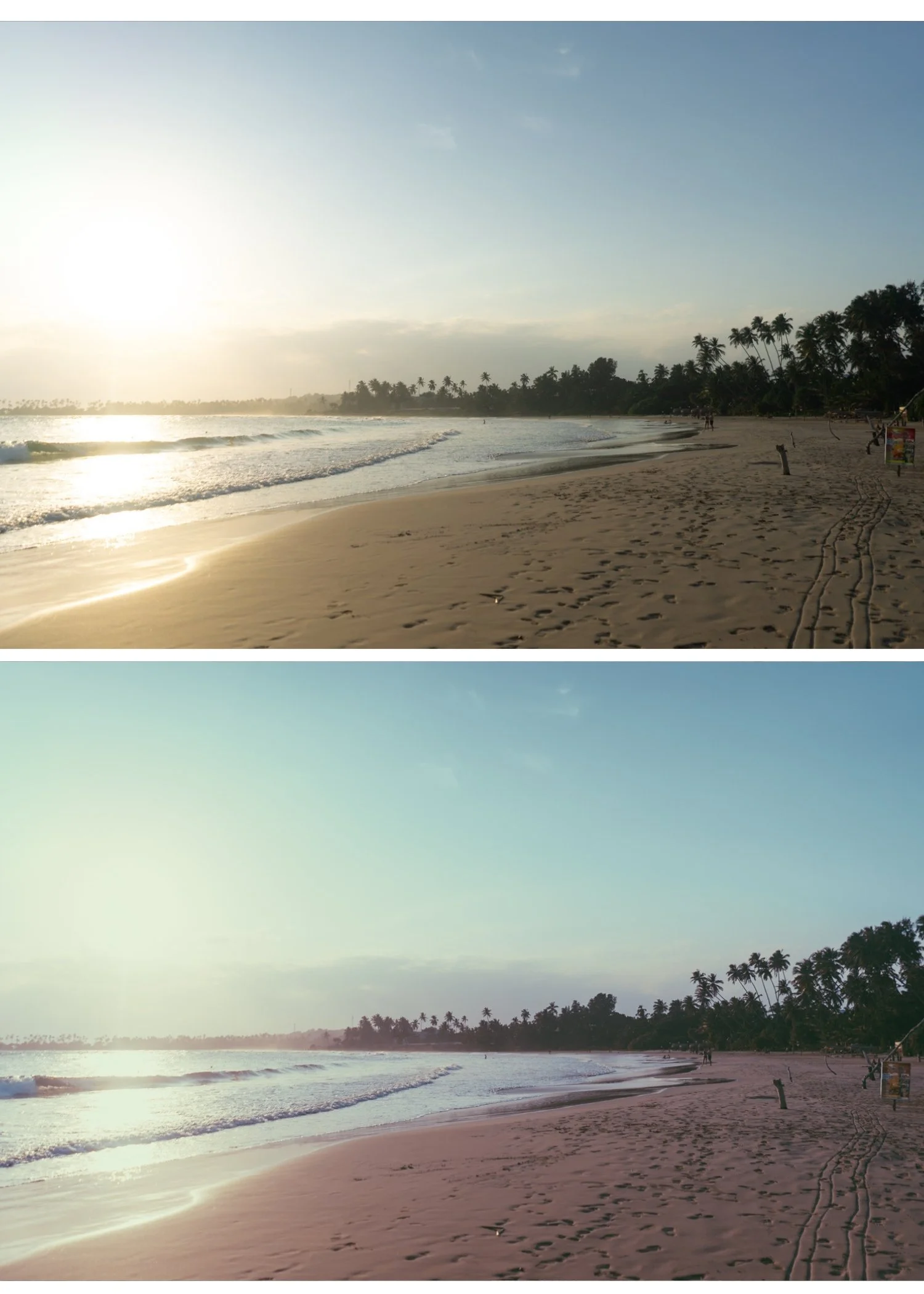
What makes the Polaroid look?
Polaroid instant film had specific technical characteristics that created its distinctive aesthetic. Understanding them is the key to recreating the look authentically in Lightroom.
Warm yellow-green color cast. Polaroid's chemical process produced a specific warm yellow with a slight green shift — different from the pure warm yellow of other film stocks. This is the most recognizable Polaroid characteristic. In Lightroom terms: Temperature +300-600 and Tint +10-20.
Heavily lifted blacks. Polaroid prints never went truly dark. The instant development process left a characteristic warmly lifted shadow quality. Blacks +30-45 is the key adjustment — significantly more than any other film look.
Reduced contrast. Polaroid had very soft, flat contrast. The tonal range was compressed — no deep shadows, no bright highlights, everything sitting in a narrow mid-range.
Slight color unevenness. Real Polaroid prints had slight color variation across the frame, more noticeable at the edges. The vignette and slight color grading variation in Lightroom approximates this.
Soft vignette. The edges of Polaroid prints were always slightly darker than the center — a gentle, natural vignette.
Coarse grain. Polaroid's grain was larger and more irregular than standard film grain. Amount 35-50, Size 40-50, Roughness 55-65 in Lightroom.
Exact Lightroom settings for the Polaroid look
Basic panel:
Exposure: +0.2 to +0.4
Contrast: -25 to -35
Highlights: -15 to -25
Shadows: +25 to +40
Whites: -20 to -30
Blacks: +30 to +45 (the most important adjustment — heavily lifted)
White Balance:
Temperature: +300 to +600 (warm yellow)
Tint: +10 to +20 (slight green shift)
Tone Curve:
Lift the black point significantly — bring the bottom-left anchor up 20-30 units
Very flat S-curve — almost no contrast
Slightly pulled down highlights
HSL — Saturation:
All channels: -10 to -20 (overall desaturation)
Green: 0 to +5 (slight green presence to reference the chemical process)
Color Grading:
Shadows: warm yellow-green (hue 50-70, saturation 20-25)
Highlights: warm yellow (hue 40-55, saturation 10-15)
Midtones: neutral to slightly warm
Effects:
Grain Amount: 35-50
Size: 40-50
Roughness: 55-65
Vignette Amount: -15 to -25
Vignette Feather: 70-80
Vignette Midpoint: 40-50
Polaroid vs other retro aesthetics
Understanding how Polaroid differs from related looks helps you stay in the right direction.
Polaroid vs vintage film. Vintage film has warm lifted blacks but clean, natural color with reduced saturation. Polaroid has the specific warm yellow-green color cast that vintage film does not. Polaroid is more distinctly imperfect and chemical.
Polaroid vs Y2K digicam. Y2K is vivid and bright with digital sharpness. Polaroid is warm, soft, and flat. They are both retro but reference completely different eras and technologies.
Polaroid vs analog film. Analog film is clean and modern with organic film characteristics. Polaroid is warm, imperfect, and chemically distinctive. Analog film aims for quality. Polaroid aesthetic aims for authenticity and nostalgia.
Polaroid look in different scenarios
Lifestyle and casual photography. The Polaroid aesthetic is most natural for casual, candid moments — it adds the feeling of a spontaneous instant photo to everyday scenes. P1 and P2 from the collection are the most versatile for lifestyle work.
Portrait photography. The warm, soft quality of Polaroid is flattering for casual portrait work. Keep Orange Saturation controlled (-5 to 0) to prevent the combined warmth of the yellow cast and skin tones from going orange. P2 Soft Instant is the most portrait-friendly.
Travel photography. Polaroid adds a nostalgic, memory-like quality to travel photos that makes them feel like moments rather than documents. P3 Faded Warm and P7 Warm Vintage work well for travel.
Nostalgia and social media content. The Y2K and retro nostalgia content trend has made the Polaroid aesthetic enormously popular on Instagram and TikTok. P4 Yellow Shift creates the most instantly recognizable Polaroid quality for this content.
Creative and artistic photography. P9 Deep Polaroid and P10 Experimental push the aesthetic to its most expressive expression for creative work.
Common Polaroid preset mistakes
Not lifting blacks enough. The single most common mistake. If your blacks are below +20, the image does not read as Polaroid. Push Blacks to +30-45 minimum. It feels extreme but it is accurate.
Wrong color direction. Polaroid is warm yellow-green, not warm orange. Many warm presets push toward orange. Ensure your Temperature is warm yellow (+300-600) and your Tint is positive (+10-20 toward green) for authentic Polaroid color.
Too fine grain. Polaroid grain was large and coarse. Grain Size below 35 looks like film grain, not Polaroid. Keep Size at 40-50 and Roughness at 55-65.
Forgetting the vignette. Real Polaroid prints always had a soft vignette. Without it, the edit reads as warm film rather than Polaroid. Keep Vignette Amount at -15 to -25 with high Feather (70-80).
Too much contrast. Polaroid was flat. Any positive Contrast value works against the aesthetic. Keep Contrast at -25 to -35.
The Polaroid Instant Archive
The Polaroid Instant Archive (P-Series) covers the full range of Polaroid aesthetics in nine calibrated presets — from classic warm instant film to cooler faded variations.
P1 — Classic Warm: The baseline Polaroid look. Warm yellow, lifted blacks, soft contrast. Most versatile.
P2 — Soft Instant: Softer, lighter version. Best for portraits and lifestyle.
P3 — Faded Warm: More pronounced fade. Best for travel and candid work.
P4 — Yellow Shift: Strong yellow cast. Most distinctly Polaroid.
P5 — Cool Instant: Cool-leaning. Unique and editorial.
P6 — Moody Instant: Darker, atmospheric instant film quality.
P7 — Warm Vintage: Rich golden vintage tones.
P8 — Soft Fade: Maximum lifted blacks and fade.
P9 — Deep Polaroid: Most characterful and expressive.
$3 per preset. Nine instant film variations.
EXPLORE THE POLAROID INSTANT ARCHIVE — $27
Free retro starting point
Polaroid on Lightroom Mobile
The warm yellow-green color cast and heavily lifted blacks translate well to Lightroom Mobile. Before applying a Polaroid preset on iPhone photos, reduce Sharpening from 40 to 20-25. Mobile cameras add aggressive sharpening that fights against the soft, imperfect quality of the Polaroid aesthetic.
Full install guide: How to Install Lightroom Presets on iPhone and How to Install Lightroom Presets on Android
FAQ
What is a Polaroid Lightroom preset?
A Polaroid preset recreates the warm yellow-green color cast, heavily lifted blacks, flat contrast, coarse grain, and soft vignette of instant film photography. The result has a nostalgic, authentic quality that feels immediate and emotional.
How do I get the Polaroid look without a Polaroid camera?
The four essential adjustments: Blacks +35-45, Temperature +400-600, Tint +15-20, Contrast -25-35. Add grain (Amount 35-50, Size 40-50) and vignette (-15-25) to complete the look.
Do Polaroid presets work on modern iPhone photos?
Yes. Reduce Sharpening to 20-25 before applying. The warm color and lifted blacks work well on iPhone photos — the main challenge is the aggressive sharpening that mobile cameras apply.
What is the difference between Polaroid and vintage film in Lightroom?
Polaroid has a specific warm yellow-green color cast and very heavily lifted blacks. Vintage film has lifted blacks but with cleaner, more natural color. Polaroid is chemically distinctive. Vintage film is organically aged.
Do Polaroid presets work for professional photography?
Yes for casual, lifestyle, and creative photography where the nostalgic aesthetic is appropriate. Less suitable for formal portraits, commercial product photography, or any work where technical accuracy matters more than aesthetic character.
