Film Look on Nikon — Step-by-Step Lightroom Guide (2026)
Film Look on Nikon — Step-by-Step Lightroom Guide (2026)
Nikon cameras produce clean, natural color with a specific characteristic that affects film look editing: Nikon's green rendering. Nikon greens are vivid and slightly warm-yellow — which makes outdoor photography look natural and vibrant in direct viewing but can fight against the muted, organic green quality of film presets.
The Nikon film look workflow is straightforward once you understand the green calibration step. This guide covers the complete process.

Understanding Nikon's color characteristics
Natural, clean color base. Nikon's color science is closer to neutral than Canon (which skews warm) but has more character than Sony (which is clinical-accurate). The result is naturally pleasant color that works well with film presets without as much preparation as Canon or Sony.
Vivid green rendering. Nikon's most distinctive characteristic in Lightroom is its green channel. Nikon renders outdoor foliage, grass, and trees with warm-yellow vivid greens that look excellent in nature photography but require adjustment for film quality.
Warm-neutral skin tones. Nikon skin rendering is warm but less red-shifted than Canon. Orange Luminance +10 to +15 is the main skin tone adjustment needed rather than Red Hue correction.
Good dynamic range with natural contrast. Nikon's tonal rendering is balanced. Highlights are not as aggressively clipping as Canon, shadows are not as deep as Sony. A relatively easy starting point for film editing.
Nikon camera settings for film look
Picture Control: Neutral or Flat
Go to Shooting Menu, Set Picture Control, and change from Standard to Neutral. For maximum editing latitude (particularly for video-style or cinematic work): Flat.
Neutral gives a more editable starting point with lower contrast and saturation than Standard. This matches the tonal range that film presets are calibrated for.
Active D-Lighting: Off
Nikon's Active D-Lighting is HDR-style tonal compression. Disable it for film editing: Shooting Menu, Active D-Lighting, Off. This gives Lightroom the full tonal range without pre-compression.
Step-by-step Nikon film look workflow
Step 1 — Camera Calibration
Camera Calibration panel, Profile: Camera Neutral or Camera Flat.
Camera Neutral is the most film-friendly Nikon profile — balanced, with good color accuracy and none of the added contrast of Camera Standard.
Step 2 — Highlights and tonal foundation
Highlights: -25 to -35 (Nikon is less aggressive on highlights than Canon but still benefits from protection) Whites: -12 to -20 Blacks: +15 to +20 (lifted shadows are the foundation of the film look) Shadows: +15 to +20
Step 3 — The Nikon green fix
This is the most important Nikon-specific adjustment.
Green Hue: -8 to -12 toward teal/yellow — note the direction. Nikon greens are already warm-yellow. To get organic film green, shift slightly toward teal rather than further toward yellow. This is opposite to the iPhone and Android green fix.
Wait — test this on your specific Nikon files. Some Nikon cameras need +8 toward yellow, others need -8 toward teal depending on the model and Picture Control. The goal is organic rather than vivid or neon.
Green Saturation: -15 to -20 regardless of hue direction. This is consistent across all Nikon models.
Step 4 — Reduce Vibrance
Vibrance: -8 to -12. Nikon's vivid rendering benefits from slight reduction before the preset.
Step 5 — Apply preset
For Nikon RAW with Camera Neutral: apply at 90-95% strength. Nikon's neutral-clean starting point is close to what most film presets assume.
Step 6 — Fine-tune after preset
Orange Luminance: +12 to +15 for portrait photography Orange Saturation: 0 to +8 Green Saturation: check if the preset already reduced it — if still vivid, add -5 more
Why Nikon greens look different in Lightroom
Nikon's green rendering references a specific spectral sensitivity that renders foliage with a warm-yellow quality that looks accurate to the eye in direct viewing. In Lightroom's editing environment — particularly compared to the muted, slightly teal-shifted greens of classic film photography — Nikon greens read as vivid and obvious.
The film aesthetic references greens as organic, slightly muted, and warm but not vivid. Nikon's greens are accurate, which is actually further from film's slightly inaccurate organic green character than Fuji or Canon.
The fix is straightforward — Green Saturation -15 to -20 is the main adjustment. The Hue direction depends on your specific Nikon model and subject matter.
Best Lightroom presets for Nikon cameras
Clean natural film: Analog Film Archive A6 or A1. Nikon's neutral base works excellently with clean analog presets — the organic warmth and muted color of A6 adds exactly what Nikon's accurate rendering lacks.
Warm vintage: Vesper Archive V1 or V3. Warm film tones complement Nikon's natural color science.
Moody: Moody Film Archive M4. Nikon's balanced tonal rendering works well with moody presets — deep shadows and warm color grading add dramatic film quality.
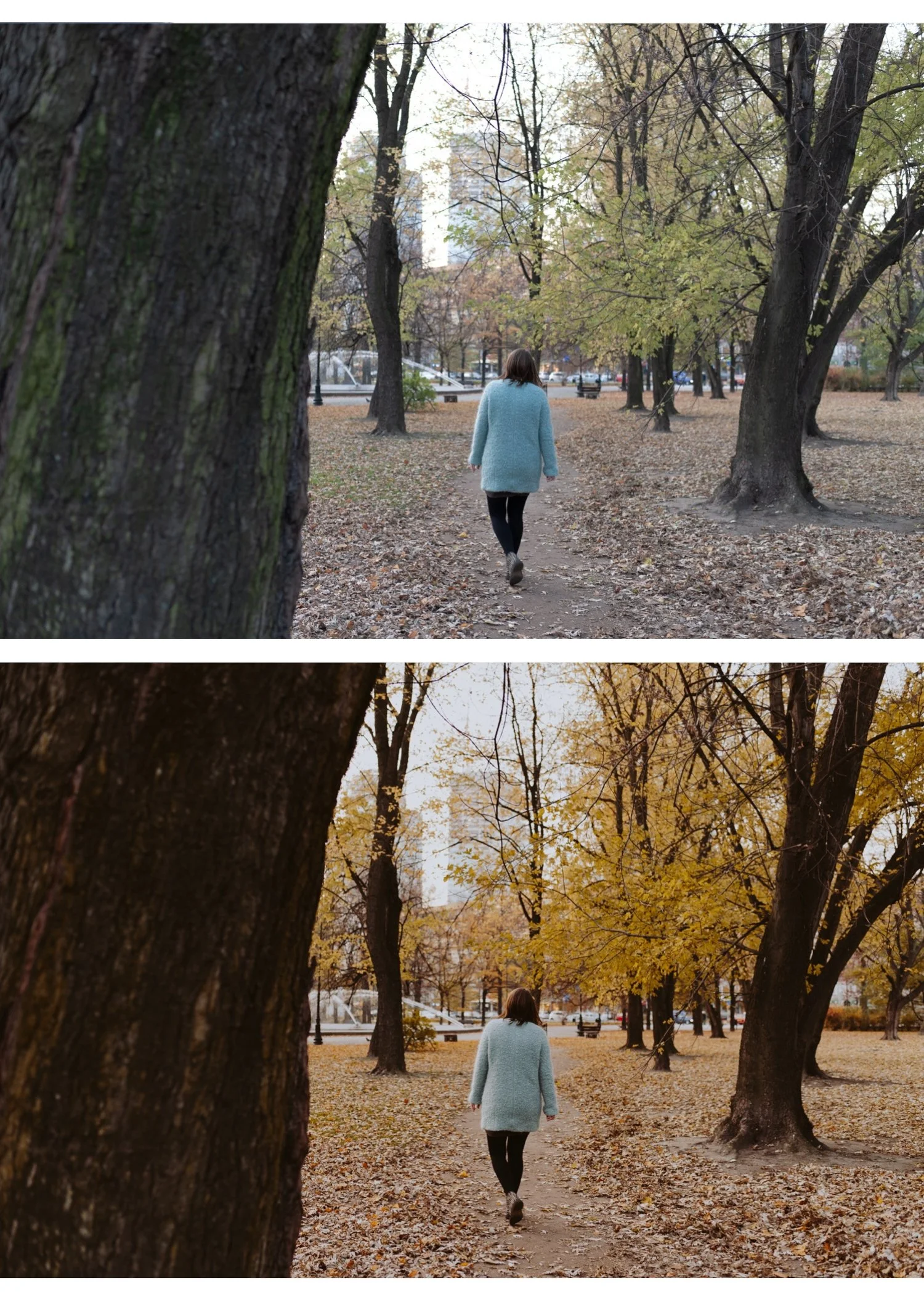
Portrait: Glow Portrait Archive G1. Nikon's warm-neutral skin tones plus G1's Orange Luminance enhancement creates natural portrait quality.
Nikon by camera type
Nikon Z-series mirrorless (Z6III, Z7II, Z8, Z9): Nikon's best color science. Excellent dynamic range, natural rendering. Camera Neutral profile, standard workflow above. Green Saturation -15 is usually sufficient.
Nikon D-series DSLR (D850, D750, D7500): Well-established, predictable files. Same workflow as Z-series. Green Hue may need +5 toward yellow rather than teal on older DSLRs.
Nikon Z30, Zfc (APS-C): More vivid processing than full frame. Reduce Vibrance -12 to -15. Preset at 85-90%.
FAQ
Why do Nikon photos look greenish in Lightroom?
Nikon's warm-yellow vivid green rendering in combination with Lightroom's Adobe Color profile. Fix: Camera Neutral profile + Green Saturation -15 to -20 in Color Mix.
Do Nikon presets work the same as Canon presets?
The same preset works on both — Nikon needs less red correction than Canon and slightly different green handling. The workflow preparation differs but the preset collection is the same.
Is Nikon or Sony better for film look?
Both produce excellent results. Nikon requires green calibration. Sony requires Vibrance reduction and green adjustment. Nikon's starting point is slightly warmer and more film-friendly than Sony's clinical accuracy.
