Soft Pastel Film Look for Spring — Complete Lightroom Guide (2026)
Soft Pastel Film Look for Spring — Complete Lightroom Guide (2026)
Spring has the softest, cleanest light of any season — and the most photogenic subject matter. Cherry blossom, fresh foliage, outdoor portraits in warm spring sun, lifestyle content in garden settings. The soft pastel film look is the specific editing direction that suits this light and subject matter best: bright, airy, gently muted, with the organic warmth of analog photography rather than the washed-out quality of typical bright-and-airy presets.
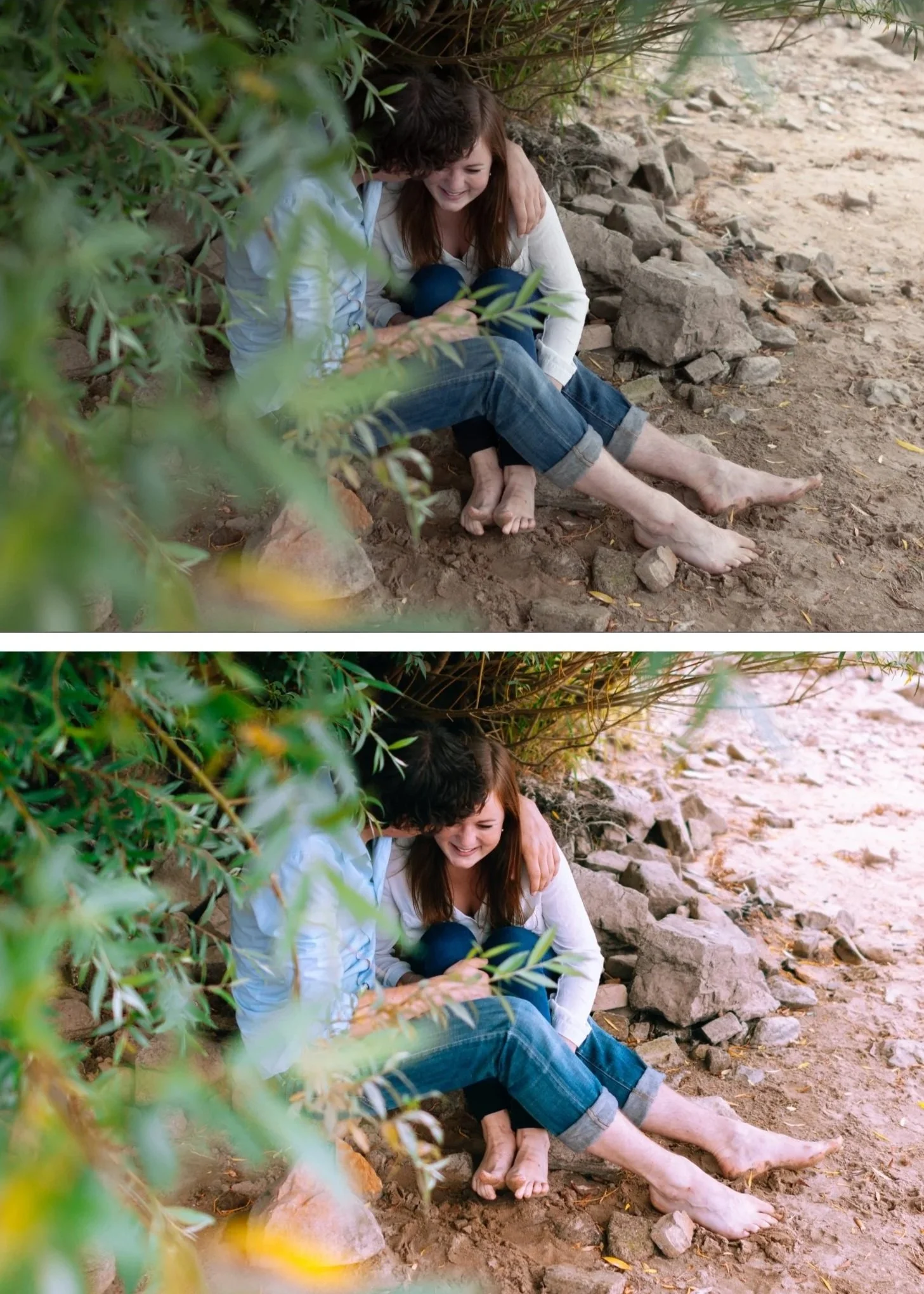
What the soft pastel spring look actually is
The soft pastel spring look has four defining characteristics that separate it from other bright editing directions.
Luminous brightness without being overexposed. Spring light is soft and diffused — the photo should reflect that quality. The approach is lifted Blacks and Exposure slightly above neutral, not highlight clipping.
Pastel muted color. Spring color is soft and organic rather than vivid. Cherry blossom pinks, soft spring greens, pale sky blues — all slightly muted from their digital-vivid starting points.
Soft highlight roll-off. White petals, bright fabrics, and light-colored surfaces must retain detail. Spring photography has more bright highlights than any other season and protecting them is essential.
Warm skin tones in a cool-ambient environment. Spring light is cooler than summer or fall, which can make skin read as slightly grey. The soft pastel approach warms skin specifically while keeping the overall ambient cool-to-neutral.
White balance for spring photography
Spring light is cooler than most photographers realize. Auto white balance typically gets close but often needs manual correction.
Outdoor spring sun: 5,200-5,400K, Tint +4 to +6. This is the clean daylight baseline.
Overcast spring: 5,800-6,200K, Tint +3 to +5. Overcast spring light has a cool-blue cast that needs warming to feel spring-like rather than winter-cold.
Spring golden hour: 5,400-5,800K, Tint +5 to +8. Spring golden hour is shorter and slightly cooler than summer golden hour.
Blossom in shade: 5,800-6,400K, Tint +5. Cherry blossom and magnolia trees in shade can appear very cool — add warmth manually.
Fix white balance before any other adjustment. A soft pastel preset on a correctly warm-neutral foundation produces the right quality. The same preset on a cooled-down Auto white balance produces a flat, slightly grey result.
The complete soft pastel spring workflow
Step 1 — Exposure foundation
Exposure: +0.2 to +0.4. Slightly brighter than neutral. This creates the luminous quality that defines the look.
Blacks: +25 to +35. Higher lift than any other season. The open, airy shadow floor is essential.
Shadows: +15 to +22. Opens the midtone shadow range.
Highlights: -35 to -45. Spring blossom and white surfaces need aggressive highlight protection.
Whites: -15 to -20. Additional ceiling protection.
Contrast: -15. Spring light is naturally soft — reducing contrast aligns the edit with the ambient.
Clarity: -10 to -12. Removes digital micro-contrast for the soft, organic edge quality.
Step 2 — Tone Curve
Lift the bottom anchor 18-22 units. Higher than moody or standard editing — the lifted shadow floor is what creates the airy spring quality.
Add a soft S-curve: point at 30% nudge up 3 units, point at 72% nudge down 3 units, top anchor down 4-5 units.
Step 3 — Color calibration
Vibrance: -10 to -15. The most important single color adjustment for the pastel look. Muting overall color without going flat.
Orange Luminance: +15 to +18. Lifts skin toward luminous and bright.
Orange Hue: +6 to +8 toward yellow. Golden warmth rather than vivid orange.
Orange Saturation: 0 to +5. Keep controlled — spring ambient plus preset can push skin toward orange easily.
Green Hue: +10 to +12 toward yellow. Spring greens shifted toward organic warm rather than neon digital.
Green Saturation: -12 to -15. Muted organic green.
Blue Saturation: -10 to -15. Softer spring sky without going flat.
Red Hue: +5 toward orange. Pink blossom shifted slightly toward warm coral.
Red Saturation: -5 to -8. Controlled pink tones.
Step 4 — Color Grading
Shadow Color Grading: Hue 40, Saturation 8-10. Lighter than fall or winter. Spring shadow warmth should be subtle — the airy brightness is the priority.
Highlight Color Grading: Hue 42, Saturation 3-5. Very slight warmth in the bright areas complements the lifted quality.
Midtone Color Grading: neutral or very slight warmth (Hue 40, Saturation 3).
Step 5 — Grain
Amount: 14-18. Less grain than other seasons. Spring photography benefits from subtle texture rather than obvious grain.
Size: 22-24. Finer grain size.
Roughness: 42-46. Keep Roughness above 42 always — this is what prevents grain from looking like noise.
Camera-specific adjustments
Canon: Camera Neutral profile. Red Hue +8 toward orange (prevents skin going orange with pink blossom subjects).
Sony: Camera Standard. Green Hue +12 toward yellow (Sony's teal-shifted greens fight against organic spring foliage without correction).
Fujifilm: Astia or Provia simulation. These film simulations are naturally suited to the soft pastel direction. Apply preset at 70-75% — the simulation does significant work.
iPhone/Android: reduce Sharpening to 20, Clarity to -12. Reduce preset strength to 75-80%. iPhone computational photography adds vividness that fights the pastel aesthetic.
Best presets for the soft pastel spring look
S2 Dreamy Soft (Bright and Clean Archive). The most luminous, soft preset in the shop. Calibrated for exactly this aesthetic — cherry blossom, soft portraits, bright lifestyle content. Apply at 80-85%.
A6 Clean Portrait (Analog Film Archive / free). The most versatile spring preset. Balanced warmth works across all spring subjects from blossom to portraits to outdoor travel.
A3 Heritage Fade (Analog Film Archive). For a slightly more vintage spring quality — the subtle fade adds character without heavy styling.
A2 Bright Minimal (Analog Film Archive). For effortless spring travel and lifestyle — clean, bright, and restrained.
Common spring editing mistakes
Making the photo too bright. Spring photography benefits from luminosity but over-exposure clips highlights and removes detail. Target Exposure +0.2 to +0.4, not +0.8. Let the lifted Blacks and soft Tone Curve create the airy quality — not the Exposure slider.
Leaving white balance on Auto. Auto white balance on overcast spring light is often too cool. Spring ambient needs manual warming to 5,800-6,200K for the pastel look to read naturally.
Too much grain. Soft pastel aesthetics lose their quality with heavy grain. Keep Amount below 20.
Positive Clarity. Positive Clarity creates a harsh, over-processed edge quality that fights against the soft pastel direction entirely. Clarity must be 0 or negative for this look.
FAQ
Why does my spring edit look grey instead of soft pastel?
Either Vibrance is reduced too far (below -20) without enough Color Grading warmth to compensate, or white balance was too cool before applying. Check white balance first (5,400-5,800K for daylight) and add Shadow Color Grading Hue 40 Saturation 10 if the result feels cold.
Which flowers work best with the soft pastel look?
Cherry blossom (sakura), magnolia, wisteria, white spring flowers generally. Very vivid flowers like tulips can fight against the pastel palette — increase Red Saturation +5 after applying to preserve their natural vibrancy without going back to a vivid edit.
Is the soft pastel look good for portraits?
Yes — particularly outdoor spring portrait sessions. Use A6 Clean Portrait at 85% with the workflow above. Check Orange Saturation after applying and reduce to 0 to +3 if skin reads as slightly warm.
Does this workflow work on phone photos?
Yes, with the phone-specific adjustments noted above — Sharpening 20, Clarity -12, preset at 75-80%. iPhone ProRAW and Samsung Expert RAW produce significantly better soft pastel results than JPEG.
